Using AI to Improve Emotional Intelligence
Rehearse tough talks, journal reactions, and review meetings with AI to build emotional intelligence while protecting privacy.
Christian Thomas

Using AI to Improve Emotional Intelligence
AI can help me slow down, check my tone, and review hard conversations without handing over my judgment. The safest use is simple: I use it to look at my own reactions, clean up my wording, rehearse tough talks, and review patterns in meetings, while keeping names and private details out.
Here’s the core idea in plain English:
- Before a conversation: I can use AI to check tone, trim rough wording, and rehearse a hard talk.
- After a conversation: I can journal what happened, rate my emotion, spot triggers, and separate facts from assumptions.
- In meetings and coaching: I can review notes or transcripts for tension, withdrawal, confusion, and missed concerns.
- For safety: I should remove identifying details, get consent when needed, and never use AI for diagnosis, crisis calls, or risk decisions.
- For practice: I should track one small behavior at a time, like pausing before replying or asking one open-ended question first.
A few numbers stand out. The article points to a 23% gain in self-awareness from AI-guided journaling over 8 weeks, and a 19% lift in empathy scores from AI role-play. Those results suggest one thing: small, repeated reflection can change how I show up at work.
What I like most is the frame. AI does not tell me what someone else feels. It helps me prepare, reflect, and respond with more care.
If I keep it simple, the workflow looks like this:
| When I use AI | What I do | What I watch for |
|---|---|---|
| Before | Tone check or role-play | Blame, vague wording, too much warmth, too much detail |
| After | Journal and review my reaction | Triggers, assumptions, emotion intensity |
| Later | Review notes or transcripts | Tone shifts, unresolved concerns, confusion, withdrawal |
The article then walks through how I can turn that into a weekly habit with short, repeatable steps.
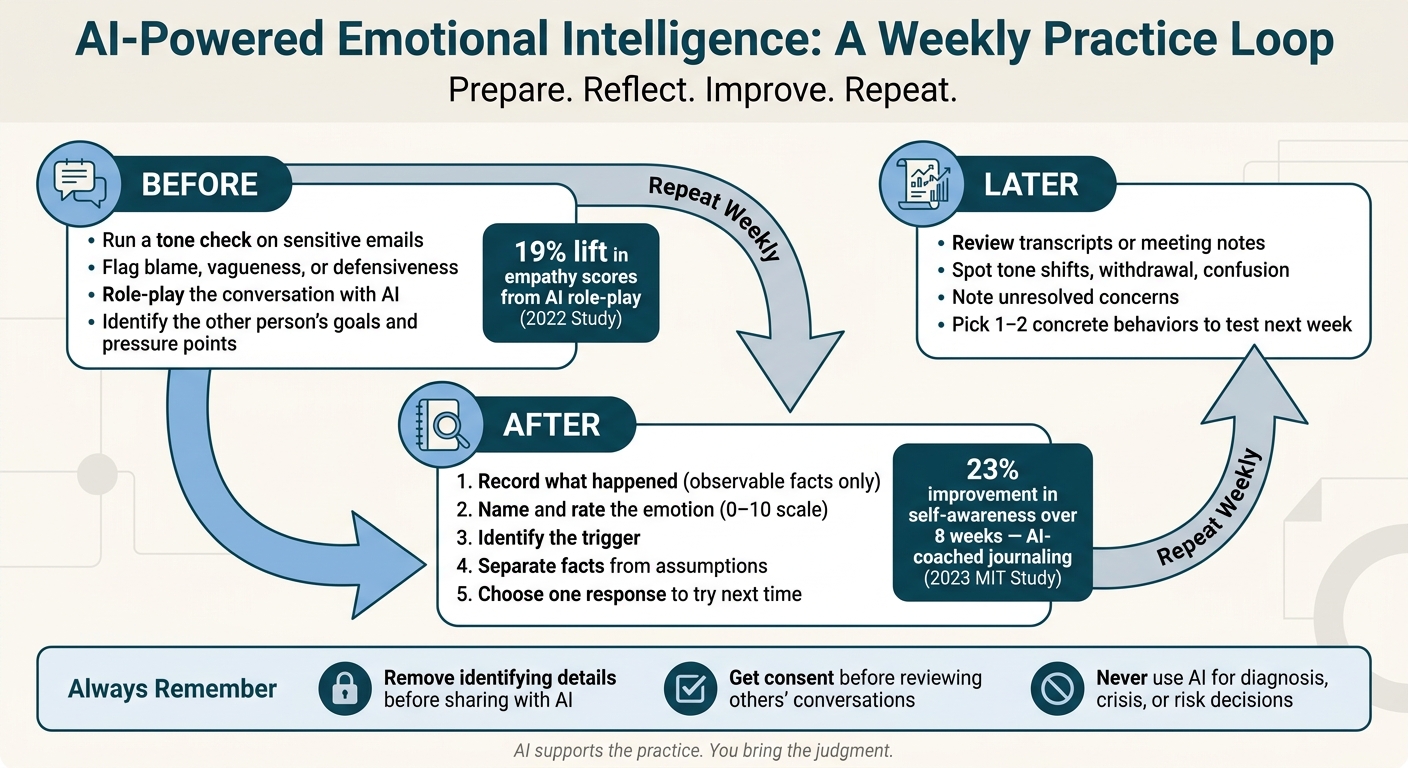
AI-Powered Emotional Intelligence: A Weekly Practice Loop
Embracing Emotional Intelligence With AI: How to Remain Uniquely Human
Use AI to Build Self-Awareness and Emotional Regulation
After the conversation ends, use AI to look at your reaction before you decide what to say next. For busy professionals, this can help you slow down, label the trigger, and pick a better response. Even a five-minute review after a hard conversation can help you spot patterns, sort facts from assumptions, and choose a calmer next step.
A Five-Step AI Journaling Review After Hard Conversations
After a client call, conflict with a coworker, or hard feedback from a leader, open a chat and paste in your raw notes. Don’t clean them up first. Share what happened, how you reacted, and what still feels unclear.
Then move through these five steps:
- Record what happened: Stick to what you could observe. What was said? What did you do?
- Name and rate the emotion: Be specific. “Undervalued” hits differently than “angry.” Rate the intensity from 0 to 10.
- Identify the trigger: Ask the AI what patterns it notices in what you described.
- Separate facts from assumptions: Use this prompt directly: "What am I assuming about the other person's intent? What are three alternative explanations for their behavior?" [3]
- Choose one response to try next time
This takes about five minutes. In a 2023 MIT study, participants using an AI-coached journaling app improved their self-awareness scores by 23% over eight weeks. [5]
Turn Emotional Patterns Into One Small Behavior Change
Once you notice a pattern, turn it into one small habit you can repeat.
If you tend to give advice before listening, ask one open-ended question before offering a fix. If you send reactive replies, pause for five seconds before responding. If you talk over people when stress kicks in, summarize what the other person said before you disagree.
Track your behavior, not their reaction. Did you pause? Did you listen? Did you respond on purpose?
You can also use that pattern to test tone and wording before your next email or meeting.
Use AI to Improve Empathy and Communication Before the Conversation
Once you know your trigger, use AI before the conversation to see how your message might come across.
Check Tone, Clarity, and Unintended Judgment in Written Messages
Before sending a sensitive message, run it through AI and ask how it may land. Share your goal, the relationship context, and what the other person may be worried about. Then ask AI to flag anything that sounds like blame, defensiveness, vagueness, or urgency. You can also ask for two or three rewrites with different levels of warmth and directness, then cut them back to match what the moment calls for.
Warmth only helps when it fits the history, power dynamics, and stakes in the relationship.
One practical caution: AI often makes messages longer. A polished, more elaborate reply can hurt your standing at work if it overshares or feels out of proportion to the situation. [2] Trim the output back to what the moment needs. No more, no less.
If the message feels sensitive, it helps to rehearse the exchange next.
Practice Empathy and De-Escalation With AI Tools for Conflict Resolution
AI role-play can give you a safe place to practice high-stakes conversations. [1] If you're about to meet with a resistant client, a frustrated colleague, or a direct report who is struggling, you can rehearse first in a lower-pressure setting.
Describe the situation, lay out the other person's goals and concerns, let AI play their side, and ask for feedback on your tone, pacing, and word choice.
The skills to practice are pretty concrete:
- Tentative emotion labeling, such as "I hear that you're frustrated"
- Reflective listening before you respond
- Open-ended questions instead of yes-or-no ones
- Clear boundaries without sounding defensive
- Offering choices when someone feels boxed in
- Slowing your pace when tension starts to climb
A 2022 study found that participants using AI-mediated role-play improved their empathy scores by 19%. [5]
Use rehearsal to strengthen your first response, not to script the entire conversation.
Use AI After Meetings and Coaching Conversations to Spot Patterns
Looking back after a conversation sharpens your judgment. AI can help you notice patterns in meetings, supervision sessions, and coaching conversations that are easy to miss in real time, but only if you stay anchored to observable behavior instead of guessing what people meant or felt.
After you rehearse, go back and review the actual conversation for what changed in practice.
Before you upload any transcript or notes, make sure everyone involved has agreed to AI-assisted review. Also check whether the tool encrypts data and whether it uses your inputs to train future models.[5] Skip that step, and trust can erode fast.
Review Transcripts or Notes for Tension, Withdrawal, and Missed Concerns
Once that’s set, use a simple four-part review. For each pattern, note:
- the observed behavior
- a likely meaning
- your confidence
- one next test[4]
Ask: Whose concerns went unresolved? At what point did the tone shift from collaborative to tense? Where did confusion appear based on repeated clarifying questions or passive responses?[4] Those questions keep your attention on what happened, not on inventing a story about what someone was thinking.
Don’t try to diagnose the situation. Pick one or two behaviors to test, and keep them concrete, like ask one clarifying question before moving to solutions or end with clear owners for every task.[4]
Where Personos Adds More Context Than General AI Tools
General AI tools can scan a transcript for sentiment shifts and flag who talked the most.[4] What they can’t do is add the relationship history that gives those signals meaning.
That’s where Personos helps. It pairs behavior signals with relationship context. Its relationship reports help you read the transcript in light of that history, and its ActionBoard turns insight into structured accountability and follow-through.
| Feature | Transcript-Only AI Tools | Human Debriefs | Personos |
|---|---|---|---|
| Pattern Detection | Tracks talk time, interruptions, and keywords | High nuance but prone to subjective bias | Combines behavior signals with relationship context |
| Contextual Nuance | Limited to the current text or audio | Deep understanding of long-term history | Uses relationship reports to bridge data and history |
| Action Planning | Generic summaries or recaps | Personalized but lacks structured follow-through | ActionBoard for structured follow-through |
| Privacy | Varies by provider | High privacy, but insights don't scale | Built for governed workplace use |
| Accountability | None | High, but peer-dependent | Follow-through tracking built in |
Conclusion: Build an Emotional Intelligence Practice You Can Sustain
After tone checks, role-play, and transcript review, the aim is consistency. Emotional intelligence is a skill you build through repeated reflection, labeling, and response practice. A weekly routine helps turn that insight into everyday behavior.
Use the same loop each week:
- Before difficult conversations: Use AI to run a tone check on a sensitive email or role-play a hard conversation. Ask it to identify the other person's goal, concern, and likely pressure points before you walk in.
- During the week: Set one behavior goal and review it before key meetings.
- End of week: Review a transcript or journal notes. Look for one recurring pattern, such as a tone shift, a missed concern, or a moment of withdrawal, and name one small adjustment for next week.
The key is staying anchored to observable behavior at every step. AI can flag patterns. You decide what they mean and what to do next. AI can't create empathy or trust, but it can help you prepare, practice, and reflect. That's the right frame.
Used consistently, this routine builds self-awareness and better responses over time. AI supports the practice. You bring the judgment and follow-through.
FAQs
How do I start using AI for emotional intelligence without overcomplicating it?
Start small and stick with it. Spend five minutes journaling about your day. Write down the main emotion you felt and what set it off. Then use AI to help spot patterns over time.
For communication, AI can work as a low-pressure practice partner. You can use it to reflect on conversations, think through what other people may have been feeling, and rehearse hard talks before they happen. Just keep one thing clear: treat its feedback as guidance, not a substitute for your own judgment.
What information should I remove before sharing notes or transcripts with AI?
Before you share notes or meeting transcripts with AI, strip out any sensitive personal details and follow your company’s privacy rules. Redact names, contact info, and any proprietary or confidential business details.
Also, make sure your use lines up with your company’s handbook, onboarding acknowledgments, and notice-and-consent practices for recording external meetings. Treat AI as an advisor, not a replacement for human judgment.
How can I tell if AI feedback is actually improving my communication?
Look for measurable shifts in actual conversations, not just better drafts with AI help. Over 30 to 60 days, track practical signals like talk-time balance, interruptions, and decision clarity.
It also helps to watch outcome proxies. Think team engagement, customer follow-up rates, or survey-based psychological safety. Those signals can show whether the feedback is changing day-to-day behavior, not just sounding good on paper.
Then sanity-check what the AI flags. Confirm those patterns with colleagues and through human debriefs so you can tell if the feedback is leading to behavior change that matters.