10 Ways AI Supports Hard 1-on-1 Conversations
How AI can help prepare, de-escalate, pace, and follow up on tough one-on-ones while keeping the conversation human-led.
Rachel Johnson

10 Ways AI Supports Hard 1-on-1 Conversations
Hard 1-on-1s usually go better when I use AI for prep, wording, pacing, notes, and follow-up, but keep the actual talk human-led. That matters because avoiding one hard conversation can cost about $7,500 per case, and practice with AI coaching tools has been linked to 42% higher confidence, 31% better outcomes, and conflict drops of 34% when NVC-style phrasing is used.
Here’s the short version of what I’d take from this article:
- I can use AI to set the tone before the meeting
- I can rehearse pushback with role-play
- I can rewrite blunt openers into calmer language
- I can turn loaded questions into neutral prompts
- I can get de-escalation wording during tense moments
- I can use AI cues to slow the pace when someone feels overloaded
- I can handle resistance with empathy-first phrasing
- I can turn messy notes into clear next steps, owners, and deadlines
- I can send short follow-ups that protect trust
- I can review my own habits like over-explaining, interrupting, and talk-time imbalance
The article also makes one point very clear: generic AI helps with prep, meeting assistants help with notes, and personality-aware tools help with live guidance. It also stresses privacy, consent, and keeping sensitive data out of consumer tools.
AI Roleplay for Difficult Conversations. Practice in Safety.
Quick Comparison
| Tool type | Best use | What it does | Main limit |
|---|---|---|---|
| Generic AI | Before the meeting | Drafts scripts, rewrites tone, role-play practice | Lacks live context |
| Meeting assistants | After or during the meeting | Transcripts, summaries, action items | Misses emotion and tension |
| Personality-aware tools | During tense moments | Person-specific prompts, pacing help, conflict resolution support | Depends on user comfort and setup |
If I had to sum it up in one line, it would be this: AI should help me prepare, stay steady, and follow through, not do the conversation for me.
What Good AI Support Looks Like in a Difficult 1-on-1
Good AI support does more than draft notes or transcribe a call. It helps you stay calm, clear, and responsive in the moment. And when the conversation starts to go off the rails, it helps you get things back on track. That work starts before the meeting, with tone-setting.
The outcomes worth measuring are specific: lower defensiveness, clearer questions, better pacing, and stronger trust. Lower defensiveness means turning blame into observable behavior and using an NVC- or DESC-style frame when pressure rises. Once the tone is steady, the next job is asking better questions.
AI can help turn vague concerns into open-ended, nonjudgmental questions that invite reflection. It can also help with pacing cues, like when to slow down, pause, or give the other person space to process. When tension rises in the middle of the conversation, the wording has to hold up under pressure.
In practice, the best tools support tone before the meeting, wording during it, and follow-through after it. Personos adds personality-aware guidance, which matters when the other person is resistant, escalated, or hard to read. That’s why preparation matters before you open the conversation.
1. Use Personos to Set the Right Tone Before the Meeting
The opening of a tough 1-on-1 sets the mood for everything that follows. One off note, or one poorly chosen phrase, can make someone shut down fast. So the first step is simple: plan the tone before you walk into the meeting.
Start by reviewing the person's Dynamic Report. It helps you gauge how they may respond to feedback, how much time they need to process what they hear, and which patterns tend to put them on guard. Then use the ActionBoard to build opening lines that match that person's likely reaction. Each suggestion comes with short notes, so you can see why it fits instead of just picking a line and hoping it lands.
It also helps to look back at your past openings with this person. If a certain style has caused friction before, don't repeat it. That small review can save you from starting the conversation on the wrong foot.
ChatGPT or Claude can help draft an opener. But they don't know the history between you and the other person, and they don't have the personality data that makes prep far more exact. Personality-aware prep gives you a plan, not just a script.
After you've chosen the opener, run it through a role-play before the meeting.
2. Rehearse the Meeting with AI Role-Play and Script Testing
Once your opener is in place, put it under pressure. Before the meeting, get clear on the kind of tension you're heading into, whether that's performance feedback, a client who's pushing back, a boundary-setting talk, or a follow-up that's gone nowhere. Then ask an AI to act like that person and respond the way they likely would: defensiveness, guilt-tripping, silence, or plain resistance. After that, test your opener against those reactions before the meeting starts.
Start by getting the raw reaction on the page. Then have AI turn that into an NVC or DESC script. When the script starts to take shape, prompt the AI to reply as if the other person feels defensive about their performance, or checked out and doubtful about the change you're suggesting. The more detail you give the prompt, the more believable the pushback feels.
After you deliver the hard part in the role-play, sit in silence for 30 seconds. That's harder than it sounds. Most people rush to explain more or walk back what they just said when the other person goes quiet. Practicing that pause helps you stay steady and leave room for the conversation instead of rushing to fill every gap.
Professionals who practiced difficult conversations with AI coaching tools reported 42% higher confidence and 31% better outcomes [2].
Generic tools like ChatGPT Plus or Claude Pro can handle basic role-play, but they only know what you tell them in that moment. Personos ties the simulation to a full personality profile, so the reactions are shaped around how this specific person tends to respond. That makes the rehearsal feel a lot closer to the actual conversation, not just some stock difficult scenario.
Once the script holds up under pressure, trim it down into calmer opening lines.
3. Generate Calmer Opening Lines That Lower Defensiveness
After rehearsal, boil the script down to one opening line. In a tense 1-on-1, that first sentence can drop defensiveness fast, or push it up just as fast.
Start with the lines that worked in rehearsal, then cut them down even more. Take your blunt draft, paste it into an AI tool, and ask it to reframe it with Nonviolent Communication (NVC) or the DESC model: Describe, Express, Specify, Consequences. That shifts the focus away from character and onto behavior. For example: "When the last two reports came in after the deadline, I felt concerned because planning depends on consistency. What's getting in the way?" It also helps to state your intent early. Something like "I'm raising this because I value how we work together" signals collaboration before the hard part hits. NVC-based framing has been shown to reduce interpersonal conflict by 34% and increase empathic accuracy by 28% [2].
One simple tactic is the two-opener strategy. Write two versions before the meeting:
- a direct version
- a softened version
Use the direct one when you have clear evidence and the other person seems steady. Use the softened one when the situation is ambiguous or stress across the organization is high. Generic tools like ChatGPT Plus or Claude Pro can produce solid NVC-style openers from a generic prompt. Personos adds more by using personality and relationship context, so the opener better matches how that person is likely to hear feedback.
Once the opener lowers threat, the next job is asking the hard question without adding pressure.
4. Reframe Hard Questions into Non-Judgmental Prompts
Once your opener lands, the next step is the hard question. This is where a lot of conversations go sideways.
AI can help you shift from blame to curiosity. The point is simple: make the question feel less like an attack and more like an opening.
Start with the raw question. Then ask AI to rewrite it as a neutral prompt using NVC or DESC. That removes character labels and keeps the focus on behavior and impact.
Stick with the same pattern each time: observe, invite, then stop talking.
| Blunt/Loaded Question | AI-Reframed Neutral Prompt |
|---|---|
| "Why are you always late with your work?" | "I've noticed the last three deliverables came in late - can we look at the timeline together to see what a realistic schedule looks like?" |
| "Why don't you ever speak up in meetings?" | "I value your perspective and noticed you were quiet today. What would make it easier to speak up in the group?" |
| "Why did you mess up the client presentation?" | "I'd like to walk through the presentation. What felt hardest, and where did the team miss support?" |
That pattern matters more than it may seem. Observe keeps you tied to what happened. Invite gives the other person room to respond. Then you stop talking, which is often the hardest part.
Personos takes this a step further by using full personality profiles and context, so the prompt matches the person and the relationship. Then pause and wait for the answer.
If the answer turns defensive, shift to de-escalation language.
5. Get De-Escalation Language in Real Time During the Meeting
Even with solid prep, a meeting can still go sideways. Someone gets defensive. Someone shuts down. A voice gets louder. Tears show up. In those moments, live AI support can help you find words that calm things down without sounding stiff or canned.
If a neutral question still gets pushback, switch to de-escalation language.
| Situation | What to Say |
|---|---|
| Employee is defensive | "I can see this is landing hard. I am not questioning your effort or intent. I do want us to look at what happened and the impact, then decide what changes next. Can we slow it down for a moment?" |
| Employee goes quiet | "What is the one thing you want me to understand right now?" |
| Employee raises their voice | "I want to hear you, and I want us to stay productive. Can we bring the volume down so we can work through it?" |
| Employee is in tears | "Take the time you need. I want to understand what's most important here." |
The goal isn't to say more. It's to say less, but say the right thing. Use the shortest phrase that steadies the room, then return to the issue.
When you prompt AI, ask for language that is respectful, empathetic, calm, and curious. It also helps to briefly name your own state: "I feel pressure too." [4]
Personos can surface real-time, personality-aware de-escalation language that fits how this person is likely to respond.
After the conversation settles, move from de-escalation to pacing so the other person has space to process.
6. Use AI to Pace the Conversation and Prevent Overload
Once the room settles down, the next job is pacing the conversation. After de-escalation, slow things down enough for the other person to take in what’s being said. If you push too much information too fast, people can shut down.
Some AI tools can flag vocal cues such as tone, pitch, cadence, volume, and speech speed that point to overload. A rising pitch and faster speech often signal stress. A flat, slow delivery can point to disengagement.
When AI flags those signals, pause for a moment, recap what’s been said, or shift direction to check alignment before you keep going. If defensiveness shows up, ask how they see it. That helps reset the conversation around their point of view.
Personos adds personality psychology context, so pacing can match how this person is likely to process stress. If the other person resists the pace or pushes back, switch to empathy-first language.
7. Handle Resistance with Empathy-First AI Suggestions
If pacing on its own doesn't reopen the conversation, switch to empathy-first language. When resistance shows up, the key move is validation without agreement. In plain English, that means recognizing what the other person feels without giving up the point. Use AI to help you validate, redirect, and keep the discussion moving.
AI can do that by acknowledging emotion, then guiding the conversation back to the issue. A reframe like "I want us to work well together, and I think something's getting in the way. Can we talk about it?" [5] keeps the door open while still naming the problem. That matters, because people tend to listen more when they don't feel cornered.
It can also help shift the conversation from blame to next steps. Instead of getting stuck in a back-and-forth about intent, you move to impact and what should happen now: "You may not have meant to - but here's how it landed." [5] That small shift changes the tone. You're no longer arguing about what someone meant. You're talking about what happened and what to do next.
Curiosity helps here too. When you replace accusation with a question, the other person is more likely to stay in the conversation: "What do you think is getting in your way?" [5] That kind of prompt lowers the temperature and gives the other person room to respond without feeling pinned down.
Personos takes this a step further by tailoring resistance prompts to the person in front of you. It uses personality-aware context to match the wording to how that person is likely to respond in the moment.
Once the resistance softens, move to agreements and next steps.
8. Capture Agreements, Deadlines, and Next Steps with AI Summaries
Once the conversation settles, a new problem shows up fast: two people can leave the same meeting with two different ideas of what was decided. You need one clear record before the next step starts.
AI can help turn a messy conversation into a clean shared summary. After a tense 1-on-1, you can paste your notes into a tool like ChatGPT Plus or Claude Pro and ask it to pull out "action items with owners and deadlines" and "follow-up topics." Then review the draft, edit it, and share it so both people are working from the same record.
Specific prompts help a lot here. Tell the AI the exact outcome you need. For example: "The response I want from this person is a revised timeline." That gives the summary a clear target instead of letting it drift into soft, vague language.
Personos goes a step further with its ActionBoard. It can turn a chat message, report insight, or prompt into a trackable action item with one click. For helping professionals, that means commitments stay visible and easier to follow.
There is one guardrail you shouldn't skip: treat the summary as a draft. Always review the output before you share it. Check it against your notes, and check it against the relationship before it goes out.
"The boundary is simple: AI prepares the manager; it does not manage the employee." [1]
That same draft can also make the follow-up message much easier to send.
9. Send Trust-Building Follow-Ups and Check-Ins with AI Prompts
Once you’ve shared the summary, the next step is protecting trust before the next check-in. A clear summary may close the meeting, but a short follow-up helps keep that trust in place. It should restate commitments, cut down confusion, and help the relationship stay steady.
Use AI to look back at the main themes, then write the message in your own voice. You can ask it to pull out the key themes, point to strengths, and draft one open-ended question for the next check-in. Then pick the question that fits that person best. In most cases, a short, focused note works better than a long message that adds pressure for someone who’s already stressed.
If you’re a helping professional juggling a lot of relationships, consistency matters just as much as the wording itself. Personos Prompts are a good fit for this kind of follow-up. They send short, personality-aware nudges based on the Five Factor Model on a daily, weekly, or monthly schedule, which helps you stay consistent even with a heavy caseload. Because each prompt is based on the individual’s personality profile, the tone and pace line up with how that person likes to take in feedback. The result feels personal, not like a template.
Only enter information you’d be comfortable documenting in a formal record. Leave out sensitive personal details, medical information, and unverified judgments. Treat each follow-up draft as part of the record you may review later, not just a box to check.
Save the wording that works best. That gives you a stronger starting point for the next conversation.
10. Review Your Own Communication Patterns to Improve Future 1-on-1s
Most people replay the other person's behavior after a tough meeting. Start with your own wording, pace, and interruptions instead.
Those habits matter more than they seem. The way you phrase things, how long you talk, and how fast you jump in can add friction without you noticing it in the moment. Looking back at that also helps you see what kind of AI help you need next, whether that's script help, pacing cues, or follow-up tracking.
After a tense meeting, paste your notes into AI and ask it to flag judgments, over-explaining, and missed pauses. Then look at the basics:
- Did you lead with observations or judgments?
- Did you over-explain after delivering hard news?
- Did you leave enough space for the other person to respond?
One of the most useful checks is your talk-time ratio. If you dominate the talk time, the meeting became a monologue. You can also review whether you used "you" statements that may have triggered defensiveness, or whether you left a real pause after delivering difficult news [2].
For helping professionals who want to go deeper, Personos' ActionBoard lets you turn a pattern you've spotted into a trackable action item and monitor one change over time.
Use what you spot to sharpen the next opener, pause, and follow-up.
Generic AI vs. Meeting Assistants vs. Personality-Aware Tools: A Direct Comparison
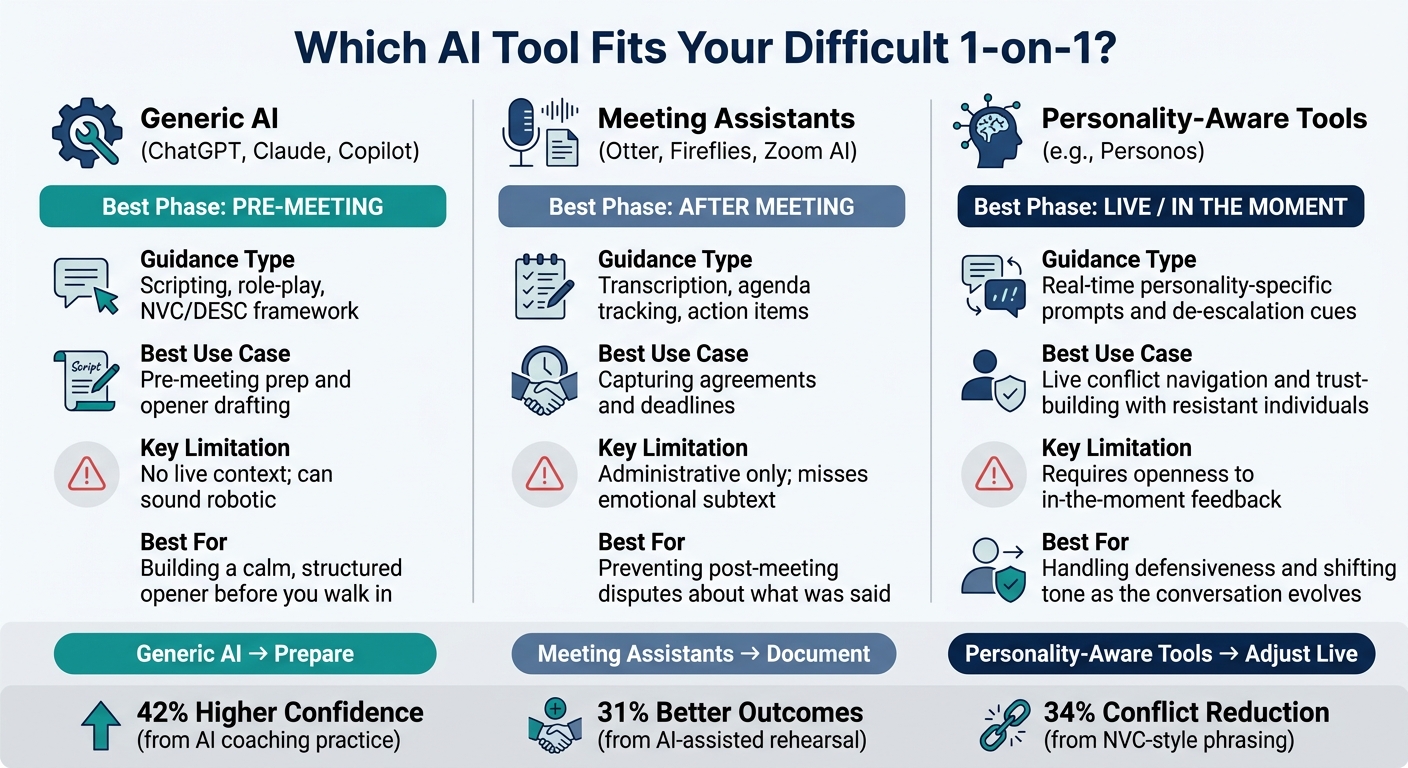
AI Tools for Difficult 1-on-1s: Generic vs. Meeting Assistants vs. Personality-Aware
When a conversation gets tense, the tool you use matters just as much as the words you pick. A simple rule helps: use generic AI for prep, meeting assistants for capture, and personality-aware tools for live guidance.
Generic tools like ChatGPT, Claude, and Microsoft Copilot are useful before the meeting starts. You can paste in a blunt draft and have it rewritten into a calmer NVC or DESC opener. You can also role-play likely pushback before you walk in. That can help you prepare, but it doesn't help in the moment once the conversation is underway.
Meeting assistants like Otter, Fireflies, and the built-in AI in Zoom and Teams are good at transcripts, summaries, and action items. They help you keep a record of what was said. But they track words, not tone or tension.
Personality-aware tools like Personos are built for the live moment when tension starts to climb. Personos is built on the Five Factor Model and measures 30 personality traits, so its guidance is calibrated to the specific person in real time. That's a big deal when someone shuts down, pushes back, or needs a different tone on the spot.
Here’s the difference at a glance.
| Tool Category | Type of Guidance | Best Use Case | Limitations | Best for tense 1-on-1s |
|---|---|---|---|---|
| Generic AI (ChatGPT, Claude, Copilot) | Scripting, role-play, framework application (NVC/DESC) | Pre-meeting prep | No live context; can sound robotic | Building a calm, structured opener before you walk in |
| Meeting Assistants (Otter, Fireflies, Zoom AI) | Transcription, agenda tracking, action items | Capturing agreements and deadlines | Administrative only; misses emotional subtext | Preventing post-meeting disputes about what was said |
| Personality-Aware Tools (Personos) | Real-time personality-specific prompts and de-escalation cues | Live conflict navigation and trust-building with resistant individuals | Requires openness to in-the-moment feedback | Handling defensiveness and shifting tone as the conversation evolves |
The best way to think about it is simple:
- Generic AI helps you prepare
- Meeting assistants help you document
- Personality-aware tools help you adjust live
Use them in sequence, then protect privacy and judgment in the follow-up. Tool choice helps, but only when it matches the conversation and the privacy risks.
Practical Safeguards for U.S.-Based Helping Professionals and Managers
After the conversation, the next risk is the information you put into the tool. Once you've picked a platform, the next step is simple: know what data is safe to enter. The more emotional or sensitive the situation, the more care this takes. These safeguards help you use AI without chipping away at trust.
Start with your privacy settings. Consumer AI tools may use your chats for training unless you opt out. Use Temporary Chat in ChatGPT or Incognito chat in Claude for low-risk drafts. For HR, payroll, or clinical data, use business-tier accounts, where data use is blocked by contract, not just a setting [3].
Do not paste names, pay details, health information, or other protected data into a consumer-grade tool. If the material includes HIPAA- or CCPA-protected information, keep it out unless you have explicit consent and you've checked that the platform meets the rules. A good rule of thumb: if you'd hesitate to put it in an email, don't drop it into a chatbot. Use anonymized descriptions instead. Personos keeps personality scores private unless the user consents.
Keep your AI workspace separate from your official records. AI can support the meeting, but the official record still belongs to the human. That line needs to stay clear. AI is not a stand-in for your case notes, supervision records, or HR documentation.
For harassment, discrimination, or safety issues, document dates, witnesses, and facts in the official record. Treat AI summaries as drafts only. Rewrite them by hand before filing.
Get consent before recording or transcribing. If you use tools like Otter or Fireflies, document that consent under HIPAA or state confidentiality rules. When people know AI is recording, summarizing, or profiling them, they're more likely to stay open in the conversation. Personos follows the same standard: people should know what data is collected and why.
Conclusion
Hard 1-on-1s get better when AI handles the prep and follow-up, and the person handles the talk itself. That split is the main pattern across the article. Prep helps sharpen the opener, the pause, and the follow-up.
Even with solid prep, the live moment still comes down to human judgment. You still own the conversation. You need to read hesitation, respond with empathy, and decide when to push and when to pause.
For helping professionals, that support gets more precise with Personos. Personos adds personality-based interventions shaped to the person and the moment.
AI works best when it helps you stay clear, calm, and consistent. This approach is central to building an AI framework for excellence in high-stakes communication.
FAQs
When should AI help, and when should I handle it myself?
Use AI to get ready for a 1-on-1 and think things through afterward. But don't let it take your place in the room. You should lead the conversation so you can listen well, show empathy, and build trust.
Before the meeting, AI can help you sharpen your goal, catch blind spots, draft open-ended questions, or practice what you want to say. Tools like Personos can help with messy team dynamics, too. Still, when the stakes are personal or sensitive, your judgment has to lead.
What should I never paste into an AI tool?
Never paste in anything that makes AI stand in for the human conversation itself.
Don’t use it to script a one-on-one word for word. Don’t use it to fix someone’s problem without actual back-and-forth. And don’t let it replace active listening just because speed feels easier in the moment.
A person is more than a neat set of data points. The second you flatten a messy, complex human into a tidy summary, you lose the part that matters most.
Use AI to get your head in the right place before the meeting, not to run the interaction for you.
How can I use AI without sounding scripted?
Use AI mostly before the conversation, not as something you lean on in the moment. It can help you get clear on what you want to say, spot weak points in your thinking, and rehearse a few responses so you walk in with more confidence, without clinging to a script.
Keep it simple. Pick one or two open-ended questions ahead of time, then put your attention on active listening and an actual human connection. Tools like Personos can also help you adjust your tone in a way that feels more natural for the person you're speaking with.