Predictive Team Mapping for Project Goals
Assign people by what each project stage requires: map demands, match team strengths, fix gaps, and review at milestones.
Rachel Johnson

Predictive Team Mapping for Project Goals
Most project delays start before the work starts. I’d sum up this article like this: define the work first, map each phase to the people best suited for it, check for gaps and friction early, then review the setup at each milestone.
Here’s the short version:
- I start with the project goal, then break it into phases, deliverables, dependencies, and decision points.
- I look at what each phase needs, such as decision pace, stakeholder handling, conflict tolerance, and solo vs. team-based work.
- I compare those demands with the team’s skills, work patterns, and likely friction points.
- I fix weak spots through role changes, pairing, coaching, or hiring, based on the type of gap.
- I review the map at major milestones because team fit can shift as scope, timing, or stakeholders change.
A few numbers make the case clear:
- A 1% gain in team performance during planning was linked to a 0.95% gain in project outcomes.
- A 1% gain in communication performance was tied to a 0.93% gain.
- 37% of organizations point to inaccurate requirements as a main reason projects fail.
- About 70% of project delays come from unclear requirements.
- Teams aware of Big Five personality profiles saw 18% to 25% better collaboration results.
- Structured lessons-learned work showed a 0.56 correlation with revenue, with p < 0.01.
If I had to put the whole piece into one line, it would be this: don’t assign people by title or availability, assign them by what each stage of the project will demand.
That’s the idea behind predictive team mapping.
High-Impact Tools for Teams by Stefano Mastrogiacomo: 10 Minute Summary
Define project demands before assigning roles
Predictive team mapping starts with a clear project goal, then turns that goal into a demand map: stages, deliverables, risks, dependencies, decisions, and the kind of work each stage calls for. If the goal is reduce onboarding time by 30% in one quarter while keeping support tickets flat, you can see what the project needs right away and what kind of people should handle it. That demand map becomes the basis for assigning roles.
PMI's Pulse of the Profession found that inaccurate requirements were the main reason for project failure in 37% of organizations, and about 70% of project delays come from unclear requirements [1][2]. That’s a specificity problem, and it starts before anyone assigns roles.
Map goals, milestones, and critical tasks
The most practical way to build a demand map is to start at the end and work backward. Begin with the final deliverable, then split the work into phases. Each phase should have a measurable output and a clear decision point. A milestone is not just a completed task. It’s a gate that opens the next phase, frees up people, or triggers approval [3]. That difference matters because it shows where the project is exposed.
After you define the phases, identify the critical tasks. These are the tasks where one delay slows down everything that follows. In most cases, they’re tied to dependencies: a compliance review that has to wait for legal sign-off, an integration build that holds up QA, or a stakeholder approval that blocks launch. When you map these early, you see where the project is fragile, not just where it looks busy.
Use the demand map to set ownership by phase.
| Project Phase | Key Deliverable | Critical Dependency | Decision Point |
|---|---|---|---|
| Requirements gathering | Approved scope | Stakeholder alignment | PM and sponsor sign-off |
| UX validation | Validated design direction | User feedback | Stakeholder approval |
| Engineering build | Completed integration | Data source readiness | Engineering lead review |
| Compliance review | Approved compliance checks | Legal or regulatory review | Compliance sign-off |
| Pilot rollout | Successful pilot | Internal testing | Go/no-go decision |
| Final release | Live release | Change control approval | Release approval |
Once the demand map is in place, the next move is matching it to team strengths.
Identify the skills and work styles each stage requires
Technical skill is only part of the picture. A requirements-gathering phase needs someone who can make sense of messy input from several stakeholders. That is very different from the deep, independent focus a build phase may need. A launch phase, on the other hand, needs someone who can communicate clearly under pressure and flag issues fast. These are execution needs, not personality labels.
It helps to document the collaboration demands for each phase, such as:
- tolerance for ambiguity
- decision speed
- comfort with conflict
- frequency of stakeholder updates
- whether the work is collaborative or independent
For example, a phase with weekly executive updates and rapid issue escalation needs someone who is concise, aware of stakeholder needs, and willing to escalate early. Put a technically strong but conflict-avoidant contributor in that spot, and the mismatch is pretty easy to predict. The good news is that you can catch it before work begins, but only if the demand map is specific enough to show it.
Next, compare the demand map with team strengths and collaboration risks.
Compare team strengths to project requirements
Once the demand map is set, compare it with the team you have. Headcount alone doesn’t tell you if the right strengths are in place. That’s where a capability grid helps.
Set it up with people as rows and critical demands as columns. Those demands can include skill, domain knowledge, stakeholder communication, decision speed, coordination, and work style. Now you’re not just asking, “Do we have enough people?” You’re asking, “Do we have the right coverage for this project?”
This side-by-side view makes it much easier to spot:
- coverage gaps
- overlap or duplication
- a critical task with no clear owner
Find coverage gaps and mismatch risks
One of the easiest problems to miss is strength concentration. A team may have several strong implementers but no natural coordinator. Or it may have deep technical talent and weak coverage for executive communication. On paper, the team can look fully staffed. In practice, it may be thin in the areas that matter most when pressure builds, such as coordination, stakeholder handling, or milestone ownership.
A simple diagnostic question helps here:
If this task gets hard, who on the team is equipped to absorb the pressure, communicate the issue, and move it forward?
If there’s no clear answer, the role is mismatched. A capability grid helps surface that kind of problem during planning, not later in a post-mortem.
Use personality-aware data to predict collaboration friction
Technical fit matters, but it’s not the whole story. Two capable people can still clash if one likes fast, direct decisions while the other wants time to reflect and build consensus first. That kind of friction can slow delivery even when both people are good at the job.
A 2024 meta-analysis found that teams aware of their members' Big Five profiles improved collaborative outcomes by 18–25% compared with teams that were not [4]. That edge comes from seeing friction coming instead of scrambling once it shows up.
Platforms like Personos add personality-aware context by using full profiles to flag likely friction before it slows delivery.
When you layer personality-aware data onto the grid, you can see which roles need rebalancing and which working rules need to change. From there, the gaps usually point to the next move: reassign roles, add support, or adjust how the team works together.
Rebalance roles and set collaboration rules
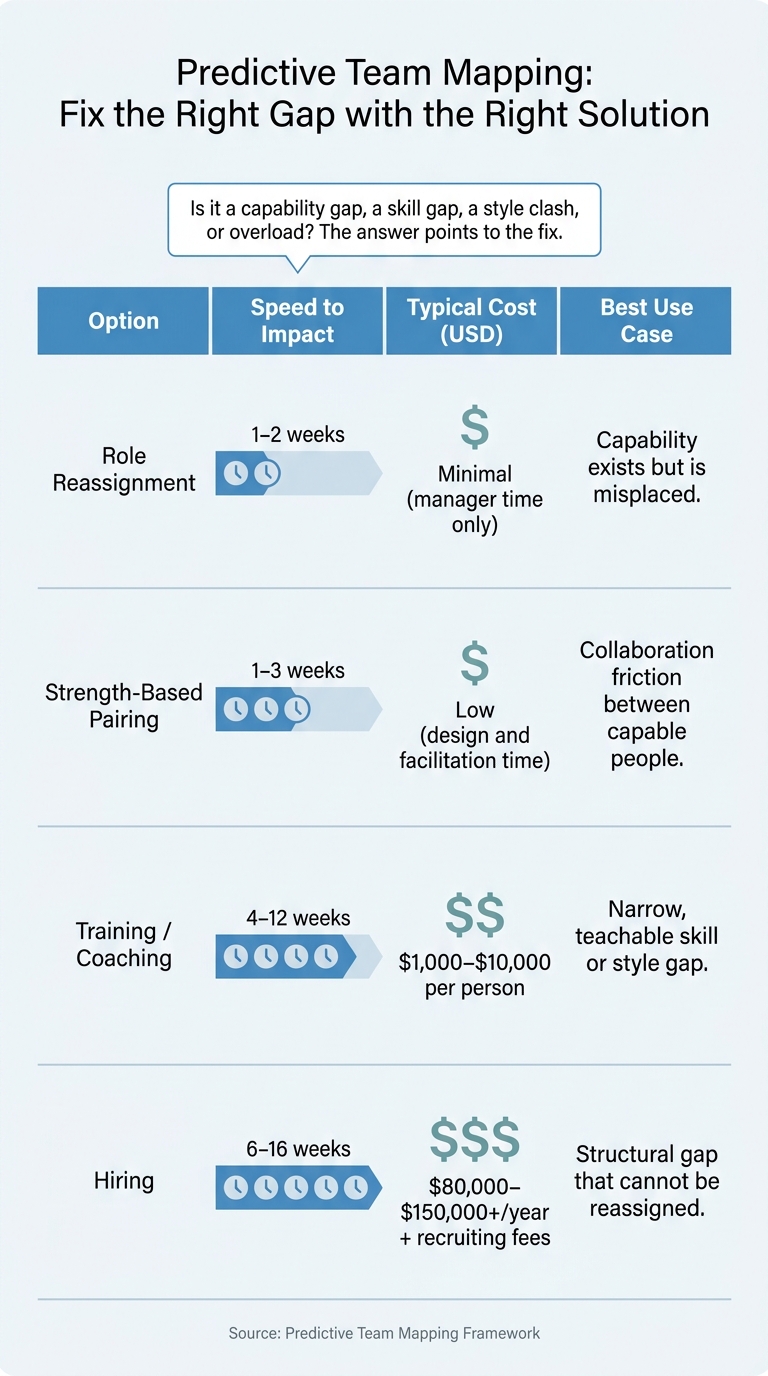
Predictive Team Mapping: Fix the Right Gap with the Right Solution
Once the team map shows the weak spots, fix them before the first high-stakes milestone. The best move depends on the kind of gap you’re dealing with.
Choose the right fix for each gap
A simple way to sort this out is to ask: Is it a capability gap, a skill gap, a style clash, or plain overload? The answer usually points to the fix.
Role reassignment works best when the capability is already on the team, but the work is sitting with the wrong person. Say your team map shows a highly analytical team member stuck doing coordination work while a less analytical colleague is handling complex forecasting. That’s not a skill issue. It’s a seat issue. In that case, tie the change to the project’s needs and to each person’s strengths. Then spell out the new ownership in a RACI matrix so accountability doesn’t get fuzzy.
Strength-based pairing is often the fastest and lowest-cost way to ease collaboration friction. Pair an idea-driven product owner with a detail-driven technical lead, for example, so big ideas stay tied to workable plans. The pairing should line up with the same collaboration risks you spotted in the team-strength comparison. Personality-aware reports can help here by pointing out likely points of tension and suggesting small communication shifts.
Training and coaching make sense when the gap is narrow, teachable, and the timeline gives people time to ramp up. Coaching is often a strong fit for collaboration and leadership issues like giving feedback, handling conflict, or changing communication style. In those cases, bringing in a new hire won’t fix the team dynamic underneath the problem.
Hiring makes sense when the gap is structural and urgent. Think required certification, deep specialized expertise, or a capacity problem that moving work around would only push onto someone else.
| Option | Speed to Impact | Typical Cost (USD) | Best Use |
|---|---|---|---|
| Role reassignment | 1–2 weeks | Manager time; minimal direct cost | Capability exists but is misplaced |
| Training/coaching | 4–12 weeks | $1,000–$10,000 per person | Narrow, teachable skill or style gap |
| Hiring | 6–16 weeks | $80,000–$150,000+/year + recruiting fees | Structural gap that can't be reassigned |
| Strength-based pairing | 1–3 weeks | Low; design and facilitation time | Collaboration friction between capable people |
Once ownership is reset, the next step is to match the meeting rhythm and decision rules to how the team actually works.
Set operating rhythms that match the team map
Use the same project demand map to decide how often the team should meet and how quickly decisions need to move. The aim is simple: line up cadence, decision ownership, escalation triggers, and communication format with the team’s real coordination capacity, not some off-the-shelf template.
For a high-pressure 12-week product launch with fast-moving marketers and methodical engineers, daily 15-minute standups during build and test phases usually make sense. Add twice-weekly decision checkpoints, with the product owner holding final call on scope changes. Any blocker that puts the launch date at risk should go to the project lead that same day.
For a 12–18 month transformation project with more reflective, analytical team members, weekly standups and monthly milestone reviews are usually enough. In that setup, escalations should center on structural issues instead of day-to-day blockers.
Decision paths need to be explicit. Give each workstream one decision owner and define what triggers escalation. Communication norms should also match what the team map shows. Detail-oriented team members usually want written specs and documented decisions. More verbal, relationship-driven teams tend to do better with live discussion first, followed by a short written summary.
Monitor the map at milestones and close with key takeaways
Review the team map as the project changes
Once roles and working rhythms are in place, check the map at major milestones to make sure it still fits the job. The version you create at kickoff rarely stays accurate for long. Projects shift. Scope changes, timelines move, budgets tighten, people join or leave, and stakeholders change their minds. If you treat the map like a living document, you can spot trouble before it turns into a bigger mess.
A simple rhythm works well: review the map at each major phase exit, including the end of discovery, completion of design, start of build, pre-launch, and post-launch review. At each checkpoint, come back to two plain questions:
- Does the current role setup still fit the work coming next?
- Do the collaboration rules still match how the team needs to work right now?
Don’t just watch deadlines. Look at the signals that show strain early. If things start to slip, pay attention to rising cycle times on approvals, more rework requests, and lower attendance in cross-functional meetings. Those signs often point to misalignment weeks before it shows up as a budget overrun. Low person–team fit has been linked to schedule delays, errors, and severe cost overruns in project environments [5]. Spotting that shift early gives you room to rebalance before the next phase starts.
Personality-aware platforms like Personos can add another layer to milestone reviews. Instead of relying on gut feel to explain why friction is building, Personos can point out when the team’s working style no longer matches the next phase. Picture a group of high-autonomy, low-structure people moving into a compliance-heavy sprint that demands tight documentation and cross-checks. That kind of signal gives the team situation-specific direction, not vague advice.
Key points to carry into the next project
Wrap up each project with a short map retrospective. Write down which role-fit patterns held up under pressure, which collaboration setups reduced friction, which changes led to measurable results, and which personality mixes worked best for that type of project. Research on lessons learned practices shows a statistically significant correlation of 0.56, with p < 0.01, between structured project learning and organizational revenue [6]. Use those findings as the starting point for the next project’s mapping work.
Keep the map active, connect major role changes to measurable results, and carry those lessons into the next project.
FAQs
How do I build a team map for a new project?
Use Personos Groups to organize team members and match them to project needs. Click Create, add the group details, and include your team members.
Then upload your organizational context, such as values, norms, resources, and role expectations, so the guidance lines up with your team’s culture and goals. As the project moves forward, Personos also gives you real-time insights into communication, collaboration, and conflict triggers.
What should I do if a phase has no clear owner?
If a project phase has no clear owner, use Personos to review your team’s roles, strengths, and working styles so you can spot the best fit.
When you weigh the needs of the project alongside how your team works together, you can assign ownership with role-aware, data-driven guidance instead of guesswork. That usually leads to stronger buy-in from stakeholders, too.
When should I update the team map during a project?
Update your team map any time the team or project context changes. That could mean new people joining, others leaving, or goals and team norms shifting over time.
Unlike static assessments, Personos adjusts as those changes happen. That helps you keep team insights current and guidance steady throughout the project.