How AI Flags Burnout Patterns Across Teams
Team-level AI flags slower replies, after-hours work, and less peer support so managers can address workload and restore trust.
Christian Thomas

How AI Flags Burnout Patterns Across Teams
Burnout often shows up in team habits before it shows up in output. If I want to spot it early, I should watch for three things: slower communication, more after-hours work, and less peer support.
Here’s the short version:
- AI can flag team patterns early by tracking reply times, work hours, meeting load, and shared channel activity
- The goal is not to single out people but to spot strain at the group level
- Managers should respond to the work setup, not push staff to explain personal mental health issues
- Early action matters because burnout can hurt care quality, follow-up, retention, and program results before turnover data shows the problem
- Tools like Personos add help after the alert by guiding managers on how to talk with staff and follow through
A lot of nonprofit and social service teams work under heavy pressure. High caseloads, staffing gaps, and hard client work can slowly change how teams talk, coordinate, and support each other. AI helps by flagging those shifts sooner, and personality-aware tools can help managers respond with care instead of blame.
4 Best Burnout Detection Tools for Businesses (2026 Edition)
How AI detects burnout patterns across teams
AI looks at team patterns like timing, frequency, volume, and language trends without identifying individuals. In most cases, those signals show up in three areas: communication, workload, and peer support.
Communication drift: slower replies, tone shifts, and silence in shared channels
One of the first burnout signs AI can spot is a change in how a team communicates. Reply times get slower. Participation in team check-ins starts to dip. People who used to show up often in shared channels suddenly go quiet.
AI can pick this up by tracking message timing, reply speed, and participation frequency, instead of watching any one person. That matters, because a single short reply might mean nothing. But when a team's shared case threads and handoff channels start to trend toward more abrupt or disengaged language, it can point to strain.
Put simply, the pattern matters more than any one message. And those small shifts often show up before output starts to fall.
Workload strain and missed follow-through: after-hours work, meeting overload, and recurring blockers
AI can also spot strain in how work gets spread out and finished. It can flag sustained after-hours activity, calendars filled with back-to-back meetings, too little uninterrupted focus time, and projects that keep getting stuck at the same stage.
When a team logs after-hours work for several weeks in a row, that's often a sign the workload is bigger than the time available. Add repeated deadline slips and stalled handoffs, and the picture gets clearer. This isn't just about packed calendars. It's about steady overload that starts to affect service delivery.
And when that kind of pressure sticks around, peer support tends to weaken next.
Support gaps: shrinking peer contact and growing isolation
AI can also surface support gaps when peer interaction starts to shrink and collaboration gets narrower. Less activity in shared channels can mean staff are losing the informal support they depend on to keep moving.
This is the kind of thing a busy organization can miss. On the surface, work may still look fine. But underneath, people may be getting more isolated and less connected to the team around them.
AI can surface shrinking peer contact before burnout appears in performance data.
The next step is responding at the team level without turning the alert into blame.
What to do with an AI burnout alert without shaming staff
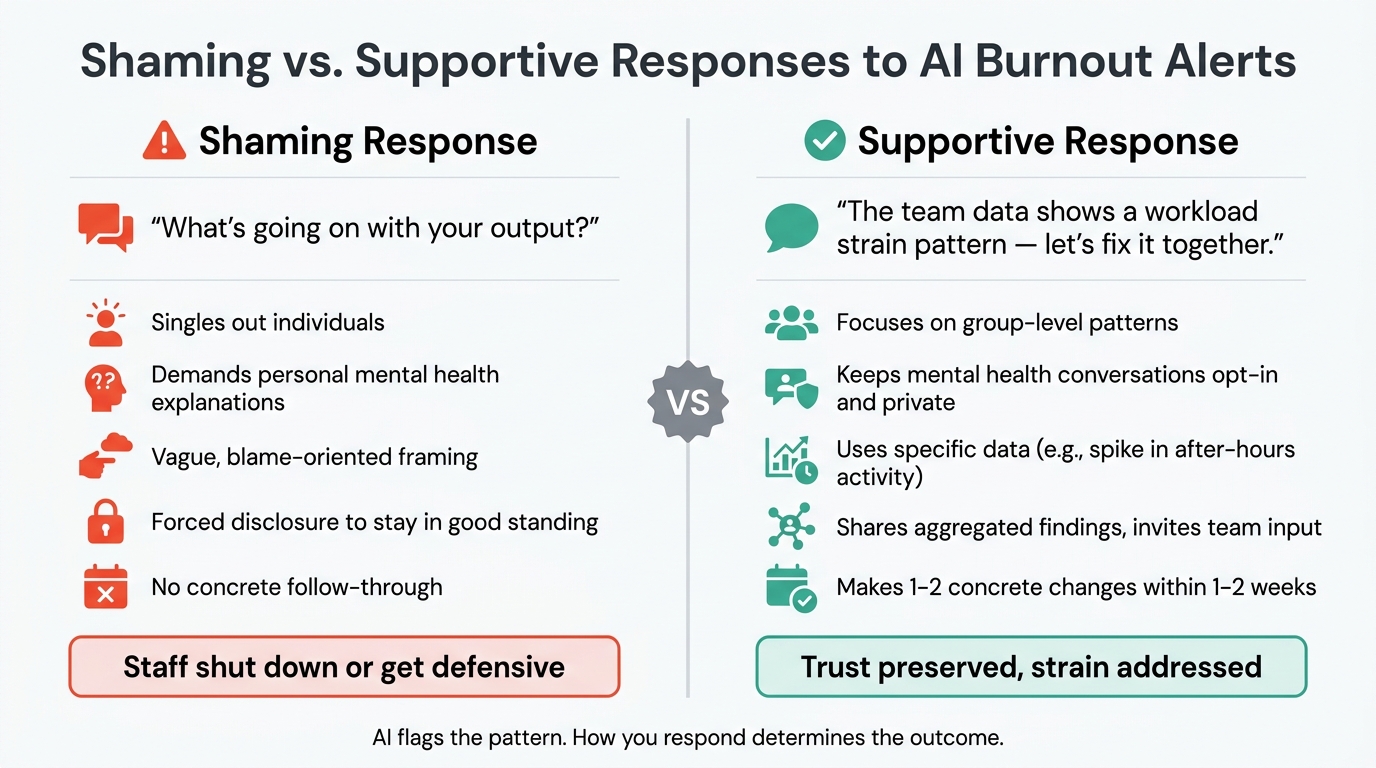
Shaming vs. Supportive Responses to AI Burnout Alerts
When AI spots burnout patterns on a team, the next step should focus on workload, communication, and support rather than on any one person. The point isn't to diagnose people. It's to fix the conditions behind the alert. Done right, the response lowers strain instead of putting blame on staff.
The wording matters a lot here. Say the team's workload pattern looks unsustainable, not that the team is under strain in a way that points fingers at anyone. The first opens the door to problem-solving. The second can make people shut down or get defensive. Share the aggregated findings, ask the team how they read the situation, and clear up stale context before making changes [1]. Use the exact data behind the alert, like a spike in after-hours activity, so the conversation feels open instead of vague. Keep sensitive conversations private, time-bound, and opt-in. Then move fast while the pattern can still be reversed.
Make changes staff can notice within 1 to 2 weeks
If leaders acknowledge the issue but do nothing, trust starts to slip. Once the team has had a chance to weigh in, make one or two concrete changes within 1 to 2 weeks. That could mean:
- Redistributing work
- Cutting meetings
- Resetting deadlines
Shaming responses vs. supportive responses
You can hear the difference in the language managers use. Shaming sounds like "What's going on with your output?" Supportive language sounds like "The team data shows a workload strain pattern; let's fix it together." One puts people on the spot. The other keeps the focus where it belongs: on the work setup.
Forced disclosure is another common mistake. Staff should never have to explain their mental state just to stay in good standing. Use opt-in check-ins and private conversations so people keep consent and control [1].
Where personality-aware platforms like Personos add value
Activity analytics tools are good at spotting when something's off. What they don't do well is tell you how to respond in a way that supports the team instead of making people feel blamed. That's where personality-aware guidance starts to matter.
How Personos explains why team members react differently to the same strain
People don't show strain in the same way. Two social workers on the same team, with similar caseloads, can react to pressure in completely different ways. One might go quiet and stop engaging in shared channels. Another might overcompensate, take on more, and work late.
Personos uses the Five Factor Model to explain why those differences show up, with Dynamic Reports at the individual, relationship, and group levels. Group reports can also help managers see whether strain is spread across the whole team or showing up more in certain subgroups.
How Personos supports better burnout conversations and follow-through
Once a manager sees how strain is showing up, the next step is the check-in. Personos helps with that part too. Personos Chat offers real-time guidance, Prompts help reinforce follow-through, and ActionBoard tracks commitments during the recovery period.
Individual personality scores are private by default. That helps keep the conversation centered on support, not labeling.
Activity analytics tools vs. Personos
Most activity analytics tools are built for general corporate productivity. They do a good job with detection, but they offer limited help for the human conversation that has to happen after an alert. Personos is built specifically for helping professionals, and that's the gap it fills.
Once the pattern is clear, the next move is response. Analytics flags the strain. Personos helps managers respond without losing the human context.
Conclusion: Catch patterns early and respond with care
Burnout rarely announces itself. It usually starts with small shifts across a team: slower replies, missed handoffs, more after-hours work, and less peer contact. That’s often where the first signs show up.
AI can spot these patterns before they grow into a bigger problem. But the alert alone isn’t enough. What happens next matters just as much.
The best response is to frame the alert as a sign of system strain, not personal failure. That keeps people engaged instead of feeling blamed or shut down.
Detection tells you strain is there. Guidance helps you handle it well. Tools like Personos combine team-level alerts with personality-aware guidance, so managers can choose the right tone and next step when helping professionals are dealing with high-stakes team conversations.
Teams tend to recover faster when managers notice strain early and respond in ways that protect trust and bring performance back on track.
FAQs
How does AI detect burnout without tracking individuals?
AI can spot team-level burnout by looking at aggregated communication and collaboration patterns, not by singling out individual employees.
It watches for team-wide signs like changes in tone, slower reply times, less collaboration, and shifts in email or meeting activity.
Tools like Personos can also help managers act on those signs with tailored, non-shaming guidance. That makes it easier to deal with workload imbalances and communication gaps before burnout gets worse.
What should managers do after a team burnout alert?
Managers should treat AI burnout alerts as a starting point, not a diagnosis.
That matters because a signal from a tool can point to a problem, but it can't explain the whole story. Before making assumptions, managers need to check in through direct, open conversations. The tone matters too. If the alert is framed in a way that feels accusatory or shaming, people may shut down instead of speaking honestly.
Tools like Personos can make those conversations more useful. They can help managers adjust how they communicate, suggest when a team member may need a break, and shape a more personal approach. But the point isn't to label someone. It's to figure out what's behind the signal, whether that's workload pressure, missing support, or something else getting in the way.
The best response is supportive and collaborative. Managers should use the alert as a prompt to listen, ask better questions, and work with staff on practical changes.
Can AI miss burnout if team output still looks strong?
Yes. AI can spot burnout even when output still looks strong. It does this by tracking small shifts in tone, message frequency, and response times that may point to strain before performance slips.
Tools like Personos help managers look past surface-level productivity and step in early with support. That might mean adjusting workloads or improving communication, without shaming staff.