How Facilitators Help Quiet Group Members Contribute
Practical facilitation strategies to let quiet group members contribute: prep preferences, offer writing, optional turns, and safe AI use.
Rachel Johnson

How Facilitators Help Quiet Group Members Contribute
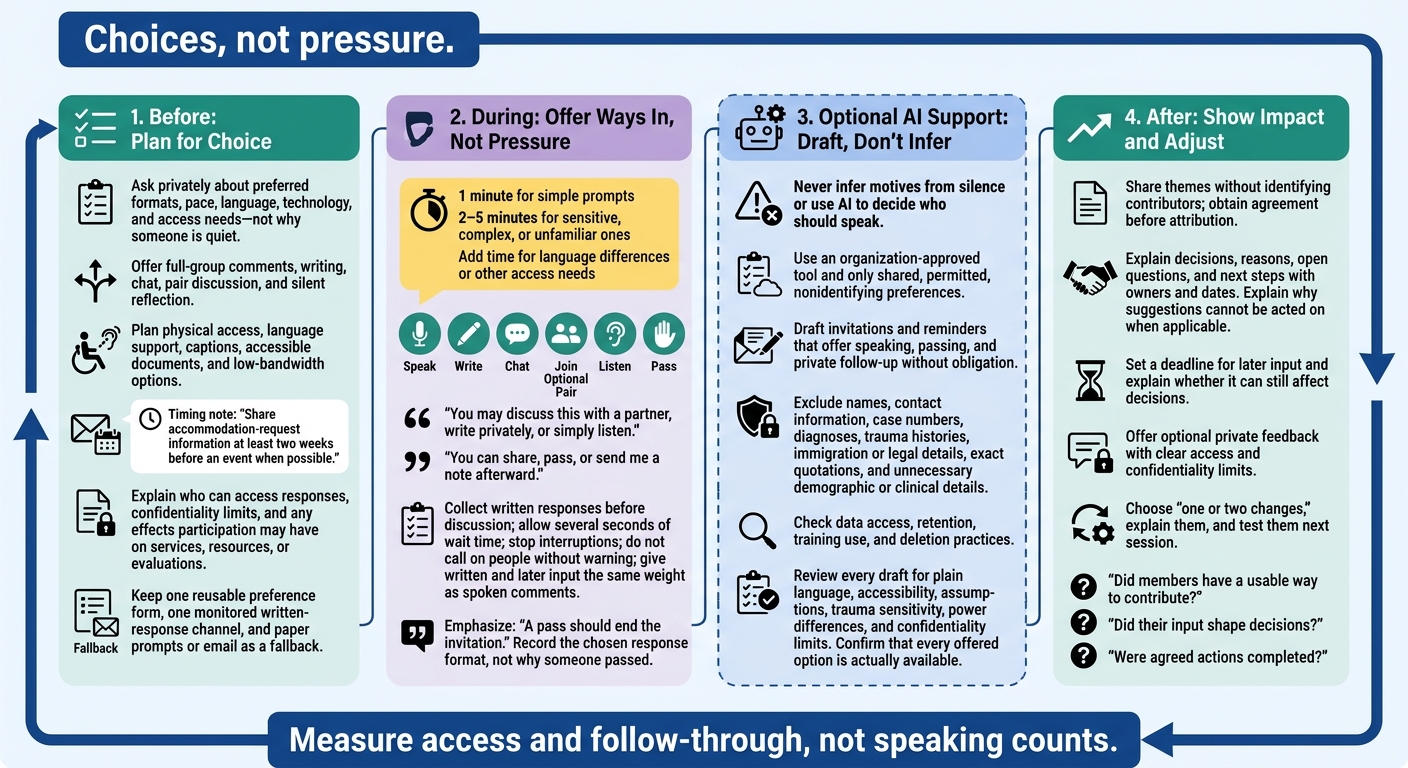
Helping quiet group members contribute starts with choices, not pressure. Offer 1 minute to write for simple questions or 2–5 minutes for complex ones, accept written input, and let members pass without explanation.
A clear plan covers:
- Before the session: Ask privately about personality-based preferences, arrange access support, and explain confidentiality limits.
- During the session: Offer optional pairs and speaking turns, stop interruptions, and give written input the same weight as spoken comments.
- When using AI: Draft invitations from permitted, shared preferences. Never infer motives from silence or upload sensitive personal details.
- After the session: Explain how input shaped decisions, invite private feedback, and check whether members had usable ways to contribute.
The goal is not more talking. It is making room for input without making anyone speak.
How to Help Quiet Group Members Contribute
Facilitation Tools and Techniques for Engaging Quiet Participants
Plan Participation Options Before the Session
Build participation choices into the agenda before the meeting starts.
Set Ground Rules That Allow Passing
List the ways people can take part: full-group comments, writing, chat, pair discussion, and silent reflection. Set rules against interrupting or speaking for others. A pass should end the invitation, not lead to another request or a demand for an explanation. Equal opportunity doesn’t require equal airtime.[3][4]
Address access barriers before choosing activities. Plan for physical access, language support, captions, accessible documents, and low-bandwidth options so quieter members can contribute in their preferred formats. Name an accommodation contact in the invitation. Seattle Colleges recommends sharing accommodation-request information at least two weeks before an event when possible.[5] Explain who can read chat and written responses.
Use one reusable preference form and one monitored channel for written responses. Don’t add tools you can’t review. Keep paper prompts or email ready as a fallback.
Once the format is set, collect preferences privately so invitations fit each member’s comfort level.
Ask About Preferences Privately
Offer an optional checkbox form or a short one-on-one check-in to learn which formats and supports members want based on how personality affects role fit. Ask about pace, language, technology, and access, not why someone is quiet.
Record only what you need to arrange support, limit who can access that information, and let members update their choices. Explain the limits of choice and confidentiality plainly. If you control services, resources, or evaluations, state whether participation affects those outcomes.
Before naming someone in the invitation, ask whether they want to be named. Also ask whether their input may be shared, who may share it, and whether it may be attributed to them. Offer private notes or a follow-up conversation if they don’t want to share publicly. Disclose any reporting obligations before sensitive information is shared.
Offer Written Input and Optional Speaking Turns
Use the preferences gathered earlier to invite input in the lowest-pressure way. Give quieter members ways to contribute without putting them on the spot.
Give Members Time to Think and Write
Explain the purpose, prompt, and time limit. Allow 1 minute for simple prompts and 2–5 minutes for sensitive, complex, or unfamiliar ones. Add time for language differences or other access needs. Collect responses on paper, in chat, or in a shared document before discussion so early speakers don’t shape everyone else’s answers.[6][8][9]
For sensitive feedback, offer an anonymous form only when the tool and process prevent identification. Explain who can access responses, whether metadata or handwriting could identify someone, how long responses will be kept, and any required safety follow-up. Share themes without naming contributors unless they’ve agreed. Set a deadline for late input and explain whether it can still affect a decision, record, or action plan.
Make Pair Discussions and Speaking Rounds Optional
Offer pairs or small groups as an optional way to prepare. For example:
You may discuss this with a partner, write privately, or simply listen.
Let participants choose a partner, ask the facilitator to match them, stay in the full group, or submit a written response. Keep groups small, with a clear prompt, time limit, and choice of how to report back. Small groups can make speaking easier, but they can also increase anxiety, conflict, language strain, or power differences.[6][8][10]
Before a speaking round, make the choices clear:
You can share, pass, or send me a note afterward.
Record the response format chosen, not why someone passed. Wait several seconds after asking a question, stop interruptions, and don’t call on people without warning. Accept a brief spoken answer, a written statement read by the facilitator, a chat message, or no response.[7][8]
Compare Ways to Participate
Give written and later input the same weight as spoken comments.
| Method | Best use case | Participation choice | Facilitator action |
|---|---|---|---|
| Private check-in | Sensitive concerns or individual support | Speak privately, message, or decline | Offer a confidential channel; confirm receipt and next steps. |
| Silent reflection | Complex, emotional, or unfamiliar prompts | Think, write, sketch, or use assistive technology | Allow at least 1 minute, add time as needed, and make submission optional. |
| In-session written response | Input during the session | Paper, chat, shared document, poll, or direct message | Give a prompt and deadline before discussion; share themes and explain how they affect the work. |
| Pair or small-group discussion | Testing ideas before full-group sharing | Join, listen, write independently, or opt out | Give a prompt, time limit, and reporting choice; collect themes without forcing disclosure. |
| Optional speaking round | Brief perspectives without pressure | Speak, pass, use chat, or send a note later | Explain choices, allow wait time, stop interruptions, and record themes without calling on people unexpectedly. |
| Later written follow-up | Input after the session | Email, form, or another accessible written format | Set the deadline, access rules, and decision timeline; acknowledge submissions and report outcomes. |
Use these same preferences when drafting AI-written invitations and follow-ups, without pushing anyone to speak. For high-stakes meetings, facilitators can use personality-driven guidance for leadership coaching to plan these interactions. Once participation formats are set, use the shared preferences to draft invitations and reminders.
Use AI to Prepare Invitations From Shared Preferences
Once participation preferences are set, use AI only to draft invitations from shared, permitted preferences. Don’t use it to decide who should speak, explain why someone is quiet, or treat silence as a choice to participate. The goal is access, not more disclosure.
Limit Personal Data in AI Prompts
Use an organization-approved tool and include only permitted, nonidentifying information. Leave out names, contact information, case numbers, diagnoses, trauma histories, immigration or legal details, exact quotations, and unnecessary demographic or clinical details. Check who can access the data, how long it’s kept, whether it’s used for training, and how deletion works.[11][12]
Keep prompts narrow, neutral, and permission-based. Here’s a hypothetical prompt:
Draft three invitations for a community group where members have requested writing time before discussion. Offer speaking, passing, and private follow-up without implying an obligation.
Check each draft for plain language, accessibility, assumptions about members’ backgrounds, trauma sensitivity, and power differences. Cut wording that singles out quieter members or suggests that speaking is expected. Make sure every option is available, and spell out the confidentiality limits of any “private” follow-up.
Consider Personos for Planning Support
Optional planning tools should serve one purpose: turning shared preferences into clearer invitations. Personos can help facilitators turn voluntary preferences and shared context into draft invitations and follow-ups. Use it as a planning aid, not a diagnosis or a replacement for direct consent. Keep individual scores private unless members choose to share them, and check organizational privacy rules before uploading sensitive information.[1][2]
Conclusion: Follow Up and Adjust
Carry these participation options into the next session, and review every AI draft before sending it, as AI enhances remote team communication by improving clarity and reducing friction.
Show how input shaped decisions without identifying contributors. Group spoken and written feedback into themes, and remove identifying details before sharing. Include decisions, reasons, open questions, and next steps with owners and dates. If a suggestion can’t be acted on, explain why.[13][14]
Offer an optional, private way to share whether the format worked. State who will see the feedback and any limits to confidentiality. Use responses to choose one or two changes: add thinking time, simplify prompts, keep smaller groups, or keep a written channel. Explain why you chose those changes, then test them next session.
Measure access and follow-through, not speaking counts. Did members have a usable way to contribute? Did their input shape decisions? Were agreed actions completed? Let people pass without asking them to explain their silence.[13][14]
FAQs
What if someone declines every participation option?
Respect their boundary and keep things pressure-free. Pushing someone to engage can increase anxiety and withdrawal. Keep offering low-stakes ways to join in, and let them observe and contribute at their own pace.
Personos can provide personality-aware guidance based on its Five Factor Model to help you understand their communication style and adjust your invitations. Use that guidance to support participation, not pressure anyone to speak.
How can I check in privately without singling someone out?
Use Personos to plan a personal, low-pressure invitation before reaching out privately. Its AI can use a group member’s private profile and shared preferences to help you decide how to approach them.
Make participation optional. Offer a written response or an optional turn to speak, so they can choose how to take part without pressure to speak.
How can I spot pressure in AI-written invitations?
Watch for wording that pushes people to act immediately, makes a reply feel required, or leaves no clear way to say no.
Tools like Personos use the Five Factor Model to help facilitators shape invitations around a member’s comfort level, based on observations or the member’s own input. This guidance helps respect a quiet member’s need for space, something generic AI prompts may miss.