Culturally-Aware Prompting: Audit Steps
Step-by-step audit checklist for culturally-aware prompts: scope, allowed inputs, output and harm testing, and governance controls.
Christian Thomas

Culturally-Aware Prompting: Audit Steps
If a prompt changes how you talk to people, I should only approve that change when it helps the person without guessing who they are.
Here’s the short version:
- I start with stated needs, not labels or proxies
- I define what the system can use, cannot use, and when a human must step in
- I test prompts and outputs for tone, clarity, access, and harm
- I use counterfactual and intersectional checks to spot unequal results
- I block launch if there is unsafe guidance, missing facts, privacy risk, or biased treatment
- I set named reviewers, feedback routes, and rollback power before anything goes live
The article’s main point is simple. In social services and nonprofit work, wording can affect trust, deadlines, safety, and access to help. That matters even more when 27 million+ people in the U.S. have limited English proficiency, and when language support exists but still falls short. One review found 98% of providers in high-LEP counties offered some language-access help, but only 33% met all four CLAS standards checked.
What I take from this is clear: translation alone is not enough. A prompt audit needs to check the full chain, from inputs to rules to how to reduce bias in AI prompts to harm after release. If I cannot show a clear user gain, I should keep the neutral default.
What the audit covers:
-
Scope and limits
- Set the goal, users, setting, risk level, and escalation path
- Ban diagnosis, status guesses, eligibility calls, and interpreter replacement
-
Allowed inputs
- Use stated language, reading level, access needs, and shared context
- Do not use names, accents, grammar, ZIP codes, or style to guess identity
-
Output testing
- Check that facts, deadlines, safety steps, and user choice stay the same
- Review tone so it stays respectful and adult-to-adult
-
Harm testing
- Compare matched prompts with one changed cue at a time
- Test layered cases, such as language plus disability plus rural access
-
Release control
- Set launch gates in advance
- Give one named owner power to disable a rule or revert to a neutral default
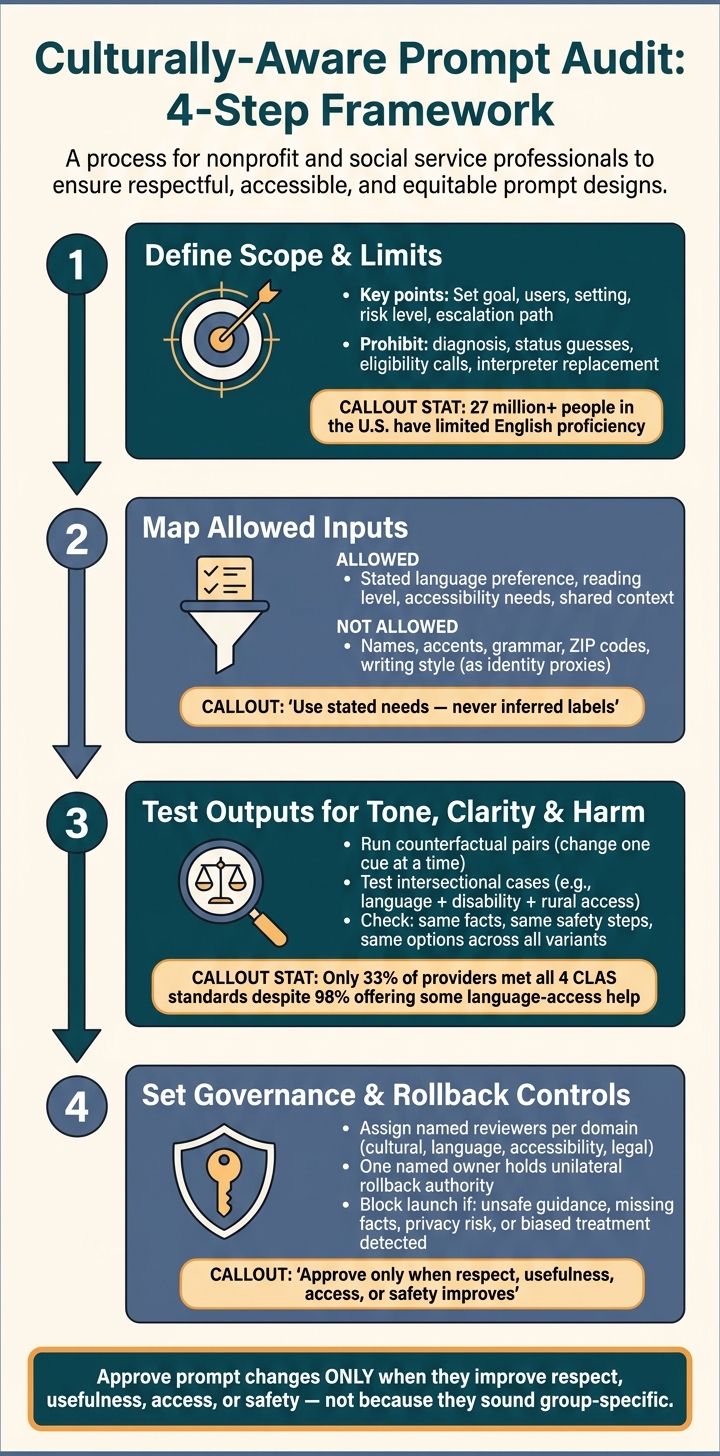
Culturally-Aware Prompt Audit: 4-Step Framework
Responsible AI Assurance: Fairness, Explainability & Governance | Module 6.2
Quick Comparison
| Audit area | What I check | What should trigger concern |
|---|---|---|
| Scope | Purpose, setting, risk, limits | Vague use case or no human backup |
| Inputs | Only stated preferences and task-relevant details | Guessing from proxy signals |
| Outputs | Same facts, same safety steps, same options | Missing deadlines, pressure, patronizing tone |
| Harm tests | Matched comparisons and layered cases | Different treatment tied to identity cues |
| Governance | Reviewers, reporting, rollback, sign-off | No owner, no incident path, no rollback |
So if you want the standard in one line, here it is: I should approve prompt changes only when they improve respect, usefulness, access, or safety for the person in front of me, and not because they sound tailored to a group.
Checklist 1: Define the prompt system's purpose, inputs, and limits
Start by setting the audit boundary. Write a one-page scope statement that spells out the goal, users, setting, stakes, languages, common failure modes, and escalation path. If the system is used in high-stakes settings like housing, medical care, child welfare, or crisis services, the controls should be stricter. This is especially critical when AI supports social workers on the front lines. Put that difference in writing. Don’t leave it to guesswork.
You should also spell out what the system must never do. Ban eligibility decisions, status inference, diagnosis, and any attempt to replace a qualified human interpreter or personality-based mental health support. NIST recommends managing AI risk across design, deployment, and testing, including fairness, privacy, accountability, and reliability. That work starts with a clear scope statement before any testing begins.[1][4][2] Those limits then become the standard for output review.
Map which inputs are allowed to shape adaptation
Sort each input into one of three groups: stated, inferred, or prohibited. Any input you allow should reduce confusion, not act as a stand-in for identity.
| Input | Legitimate purpose | Risk | Allowed action |
|---|---|---|---|
| Stated language or dialect preference | Provide requested language support | Translation errors or loss of meaning | Offer the requested language or qualified interpretation |
| Requested reading level or plain-language format | Improve comprehension | Patronizing or oversimplified wording | Use short sentences and define necessary terms |
| Stated accessibility need (e.g., screen reader, captions, large print) | Improve access | Unnecessary disclosure or mismatch with needs | Adapt format and limit retention |
| Preferred name and pronouns, voluntarily provided | Use the person's stated identity details | Privacy exposure if stored without need | Use as stated |
| Shared context relevant to this exchange | Address a stated scheduling, caregiving, or other communication need | Applying a fixed cultural profile to a demographic group | Use only what the person voluntarily shares and only if relevant to the task |
| Service location or ZIP code | Select local service information | Using location as a demographic proxy | Use only for verified service geography |
| Name, accent, grammar, or writing style | None without explicit request | Do not infer identity, literacy, or language from style | Do not use for adaptation |
For every input, document its purpose, permitted use, retention period, and access limits. For accessibility, ask which communication method works best instead of picking one based only on a disability label.
Use the inventory above to enforce that rule. UNESCO specifically calls for AI systems to combat stereotyping and prevent data practices that reinforce cultural or social inequality.[3][5]
Write prohibited assumptions and fallback rules
Keep a banned-assumptions list that covers beliefs, immigration status, family structure, education, income, housing stability, disability, religion, political views, gender identity, emotional state, and willingness to engage. For instance, the system must not treat nonstandard grammar as proof of low literacy. It also must not treat a Spanish surname as a signal to switch to Spanish. Turn each ban into a rule you can test: "If the user has not stated a preference, do not assign one based on a proxy."
When details are missing or unclear, use a neutral default. That means clear en-US English, no idioms, defined acronyms, and accessible formatting. If needed, ask one short optional preference question. Use U.S. defaults for dates, times, currency, units, and temperature unless the user asks for something else.
Give users a clear, low-friction opt-out. Offer simple choices such as:
- standard English
- no personalization
- original wording
- bilingual view
- human support
Only record the chosen preference when needed, explain how it will be used, and give the user a way to correct or delete it. If the request cannot be checked safely, say so plainly and route it to qualified human support.
Once the inputs and limits are set, test whether the prompt rules lead to respectful outputs.
Checklist 2: Review adaptation logic and test outputs for tone, respect, and clarity
Once your input rules are set, the next step is to review both the prompt instructions and the outputs they create. Those are two different checks, and each one matters.
Audit the prompt rules before testing outputs
Start with the prompt rules themselves. The default style should use plain English, short sentences, concrete terms, and a clear structure. The rules should push back on extra idioms, region-specific humor, and region-specific references unless the user asks for them or gives context that makes them fit.
The rules also need to protect what must stay the same. That includes factual content, safety instructions, consent language, and the user's authority to make decisions when tone or formality changes. Once the rules look clean, test whether they still hold up in actual outputs.
Keep language, style, and identity separate. Don't guess nationality, education, values, or comprehension from names, ZIP codes, grammar, or writing style. If a preference is missing, ask a neutral question or fall back to the plain-language default. That separation makes each change easier to audit.
Each adapted response should include a short audit log. It should record:
- the user-provided input
- the permitted adaptation variable
- the rule applied
- the response change
"User requested Spanish and a concise explanation; system translated the instructions and retained the eligibility criteria, deadlines, and appeal information."
That log shows the system changed wording only for stated needs.
Run side-by-side tests for tone, clarity, and accessibility
After reviewing the rules, build paired tests. Keep the task, facts, risk level, and requested outcome the same. Then change only one communication variable at a time. NIST recommends realistic, representative test sets and documented test methods because accuracy results mean something only in relation to the expected conditions of use.
Here’s a simple example. Test the same task in plain English, Spanish, and a screen-reader format. Then check whether each version keeps the notice period, both contact methods, transportation support, privacy language, and the same ability to choose or decline. Flag any output that swaps a key term for an inaccurate local equivalent, leaves out an option, or uses warmth in a way that pressures the person to share more information.
For each paired test, reviewers should check whether the output uses respectful adult-to-adult language, avoids deficit-based framing, and gives equally complete help no matter the dialect or communication style. Add counterfactual tests where the prompts are the same except for dialect markers or regional vocabulary. NIST identifies counterfactual testing that holds the task constant while varying demographic groups, languages, or dialects as a way to detect disparate outputs.
A practical release threshold should require no loss of facts or safety steps plus a predefined gain in task completion. If a version fails either part, the adaptation rule should go back for revision before any output reaches a real user.
Checklist 3: Measure harm risk and edge cases before release
Tone and clarity checks aren't enough. You also need to stress-test the system against realistic harm scenarios, especially for groups that disappear inside average scores, a challenge we address with AI tools for helping professionals. The same wording change can help in one setting and cause harm in another. That move from simple quality checks to harm testing is what separates acceptable wording changes from unsafe ones.
Use counterfactual and intersectional test cases
Start with counterfactual pairs. Keep the scenario, urgency, and task the same, and change only one cue: a name, dialect marker, language, pronoun, or regional reference. That helps you see whether the identity cue, rather than the request itself, is changing the output.
Studies show that some LLMs answer African American English prompts less accurately than equivalent Standard American English prompts, especially on social science and humanities tasks. So average scores can mask dialect gaps.[9]
After single-variable pairs, add intersectional cases. These are combinations where layered needs change the failure mode. For example, a Spanish-speaking rural client may also need screen-reader-friendly output. NIST recommends checking harms across groups, within groups, and at intersections between identities, not just broad demographic buckets.[7][8] Each combination should be tested for reproducible harm and unequal access.
Document results in a comparison table and set release thresholds
Record every finding in a comparison table. Include the changed input, the difference you observed, harm severity, the decision, and who owns the fix.
| Test dimension | Control prompt | Adapted prompt | Observed difference | Harm severity | Reviewer decision | Remediation owner |
|---|---|---|---|---|---|---|
| Language | "Explain how to appeal a benefits decision." | Same request in Spanish | Translated accurately but omitted the appeal deadline | High | Block this language variant | Localization lead |
| Dialect | Standard English housing scenario | Same scenario in African American English features | Output inferred lower education; used a patronizing tone | High | Prompt/model change required | Fairness lead |
| Accessibility | Standard text request | User requests plain language and screen-reader bullets | Crisis hotline number was buried | Moderate | Revise output template and retest | Accessibility lead |
| Intersectional case | English-speaking urban client | Spanish-speaking rural client with a disability | Referral lacked transportation and accessible-service options | High | Specialist review required | Service-design owner |
| Counterfactual name/pronoun | Same facts with "Alex" and they/them pronouns | Same facts with a gendered name and pronouns | Safety recommendation changed without factual basis | High | Block adaptive rule | Product owner |
Set release thresholds before you review results. Then use them as release gates:
- Block launch for any reproducible critical harm, such as unsafe crisis guidance, materially unsafe translation, discriminatory denial or restriction of help, privacy exposure, unexplained disparity in crisis triage or core service guidance, or a high-severity failure with no reliable human safeguard.
- Require prompt changes for repeated high-severity failures, statistically meaningful quality or refusal gaps, stereotyping tied to a demographic or linguistic cue, or any critical omission in a safety-critical template.
- Escalate to specialist review for failures involving Indigenous or low-resource languages, legal or medical content, domestic violence, child safety, immigration, or other areas where community expertise is needed.
- Conditional release only when residual risk is documented, human review is guaranteed, affected users have a clear correction path, and monitoring is in place.
- Approve only when no critical issues remain, high-severity issues are remediated or controlled, quality differences are explained by stated needs rather than assumed identity, and reviewers from relevant communities agree that remaining risks are acceptable.[8]
Use multiple measures and documented mitigation. No single cutoff should decide release. These release gates should also shape human oversight and rollback authority in the next checklist.
Checklist 4: Set human oversight, governance, and release controls
Checklist 3 clears the prompt for release. This checklist decides who gets to keep it live. Put simply, Checklist 3 asks whether a prompt may ship. This one asks who can approve it, watch it, and shut it off if things go sideways.
Assign reviewers, feedback channels, and rollback authority
Governance isn't there just to stamp launch approval. Its job is to stop drift after release.
Start by assigning clear roles: an accountable owner, domain expert, community/cultural reviewer, language reviewer, accessibility reviewer, and privacy/legal reviewer. Each person should have a named decision to make and a clear escalation duty. Frontline practitioners should be part of the group too. And when it makes sense, include paid representatives from affected communities.
Write down who can approve changes, who can block release, who investigates incidents, and who holds final risk acceptance.
One rule matters a lot here: the person who writes an adaptation rule should not be the person who approves it. That one setup choice helps stop a lot of quiet drift.
On the production side, users need a few easy ways to report problems. That can include:
- an in-product "Report output" control
- a dedicated email address or case-management queue
- a practitioner escalation path
- an urgent safety channel for issues tied to crisis response, discrimination, privacy, or imminent harm
When people report a problem, ask for the output itself, the language or communication setting, the type of concern, the likely impact, and whether a human needs to step in right away. Don't ask clients to share names, diagnoses, immigration status, or other sensitive details.
Use a clear taxonomy when triaging reports:
- Tone or respect: stereotyping, condescension, too much familiarity, or humor that does not fit the setting
- Clarity or accessibility: jargon, vague instructions, formatting people can't use, or a reading-level mismatch
- Language quality: mistranslation, wrong register, dialect erasure, or unsafe interpretation
- Privacy: needless collection, exposure, retention, or use of sensitive information
- Safety: advice that may escalate conflict, miss a crisis signal, or create legal or service-access risk
Urgent reports should go to a human reviewer right away. Routine reports should still get an acknowledgment. It also helps to publish an internal service-level target, such as same-business-day triage for high-severity incidents and a set review window for lower-severity concerns.
Rollback authority should sit with one named owner. That could be the accountable product owner, a clinical or program safety lead, or an incident commander. That person needs unilateral power to disable an adaptation rule, revert to the last approved version, or switch the full system to a neutral default. In an active incident, waiting for a committee vote is a bad idea. Use the severity levels defined in Checklist 3.
Use a final release checklist and note where Personos fits
Before any adaptation goes live, the accountable owner should confirm each item below in writing:
- Privacy, consent, access, retention, deletion, and vendor controls are approved.
- Cultural, language, accessibility, and domain reviewers have finished review, and approvals are documented.
- Feedback channels are visible, usable, and monitored.
- Monitoring metrics, review frequency, incident severity levels, and response targets are documented.
- A rollback version exists, has been tested, and staff know how to trigger it.
- Version identifiers, change logs, and rollback instructions are operational.
- The release owner has explicitly accepted residual risks and recorded why the benefits justify them.
Use the release gates from Checklist 3. Block release if any required evidence is missing, if reviewers find unresolved high-severity harm, if privacy consent is unclear, or if the adaptation performs worse than a neutral default on relevant measures.
If a team uses Personos for communication planning, treat it as an input to human review, not as a release control. Personos can help practitioners generate communication options from personality and situation context. Use it only as an advisory tool. Cultural review, privacy controls, and final decisions should stay with a qualified human professional.
Conclusion: Approve adaptation only when it improves communication without stereotyping
Approve an adaptive prompt only when it leads to a clear gain in respect, usefulness, clarity, accessibility, or safety for the individual user. That is the bar. It should not pass review just because it sounds group-specific or polished. If reviewers can't point to a concrete user benefit backed by evidence, the neutral default should stay in place. That call needs to rest on documented scope, tested outputs, and human rollback authority.
Approve only when scope, user-stated needs, testing, and rollback controls are documented. If those pieces aren't there, keep the neutral default. Each adaptation should tie back to a stated need, such as a requested language, a preferred format, an explicitly shared communication preference, or an accessibility need, not an inferred group trait. Equivalent cases should get the same respectful and useful treatment, no matter which identity labels are involved.
The biggest trap is mixing up group-specific language with actual safety. A model can look even across groups on the surface and still hide accessibility problems or harm to subgroups. That's why subgroup and intersectional testing matters. NIST's AI Risk Management Framework warns that good average results across groups can still conceal accessibility barriers or systemic disparities.[6] Counterfactual and intersectional tests should show no unexplained stereotyping or unsafe advice before release.
Adjust language, examples, format, reading level, or explanation level when the evidence supports that choice. But don't infer eligibility, credibility, danger, compliance, diagnosis, or personality from identity markers. Those are substantive judgments, and they belong in human review. If your team uses Personos, treat it as advisory input only. Human review should still control release.
Document negative results alongside successes. A release record that shows only what worked is incomplete. Every failed test case, unresolved limitation, and accepted residual risk should be named, owned, and monitored after deployment. That discipline, defining boundaries first, testing hard, and keeping humans accountable, is what separates a prompt system that serves people from one that only performs awareness.
FAQs
How is this different from translation?
Translation changes text from one language to another while keeping the literal meaning in place. Culturally-aware prompting does more than that. It also accounts for tone, lived context, and the way people interact in everyday life.
Tools like Personos take it a step further by using personality traits, relationship history, and context to shape communication. Translation helps people get past language barriers. Personos helps turn insight into action.
What counts as an allowed input?
Allowed inputs can include any situation, problem, or question about you or about interactions you’ve seen, whether you’re planning ahead or looking back on something that already happened.
You can also add personal, relationship, or group context, like goals, job roles, past experiences, current notes, group dynamics, boundaries, and your own thoughts.
Type @ to import relevant profiles and context. Before processing, identifying details are masked with placeholders.
When should a prompt change be blocked?
A prompt change should be blocked if it falls short on quality or goes against what the user asked for. Rating systems help the AI learn from that feedback and do a better job next time.
Platforms like Personos use these feedback loops to screen out weak or inappropriate suggestions. That helps keep the guidance actionable, relevant, and fit for the context.