AI Team Tool Integration: Guide for Nonprofits
AI should go where nonprofit work already happens: pilot 3-5 workflows, lock down data rules, start small, and measure impact.
Rachel Johnson

AI Team Tool Integration: Guide for Nonprofits
If your team is switching between chatbots, email, docs, CRM records, and meeting notes all day, AI should go where the work already happens. For most nonprofits, the best first step is to test 3 to 5 workflows, set a one-page data policy, start with 2 to 3 staff members, and review results at 30, 60, and 90 days.
Here’s the short version:
- Tactical AI is one-off use, like drafting text in a chatbot
- Integrated AI works inside tools like Slack, Google Workspace, Microsoft 365, Zoom, and your CRM
- The best early use cases for AI tools built for nonprofits are:
- donor follow-ups
- grant draft support
- meeting transcripts and summaries
- intake documentation
- coaching prep
- Free consumer AI tools can create data risk if staff paste in client or donor details
- Paid business or enterprise plans are a better fit when your team handles client notes, donor records, health data, or gift amounts
- Every AI output that goes to donors, funders, clients, or leadership should get human review
- Success should be tracked with plain metrics like:
- hours saved per week
- report drafting time
- donor response rates
- staff confidence in hard conversations
A simple way to think about it: pick one tool for one job, prove it saves time, then decide whether to expand.
Quick comparison
| Approach | What it does | Setup | Data risk | Best use |
|---|---|---|---|---|
| General chatbot | Drafts and summaries by prompt | Low | Higher on free tiers | One-off writing help |
| AI inside work tools | Recaps meetings, drafts emails, assigns tasks | Low to medium | Lower with paid plans | Daily team workflows |
| AI inside CRM | Uses donor or program context | Medium | Lower with contracts and access rules | Fundraising and case records |
| Coaching-focused AI | Helps with supervision and hard conversations | Low to medium | Lower with consent-based setup | Frontline staff support |
If I were doing this at a nonprofit, I’d keep it simple: map the work, lock down the data rules, run a 30-day pilot, and measure whether the tool cuts admin time without adding risk.
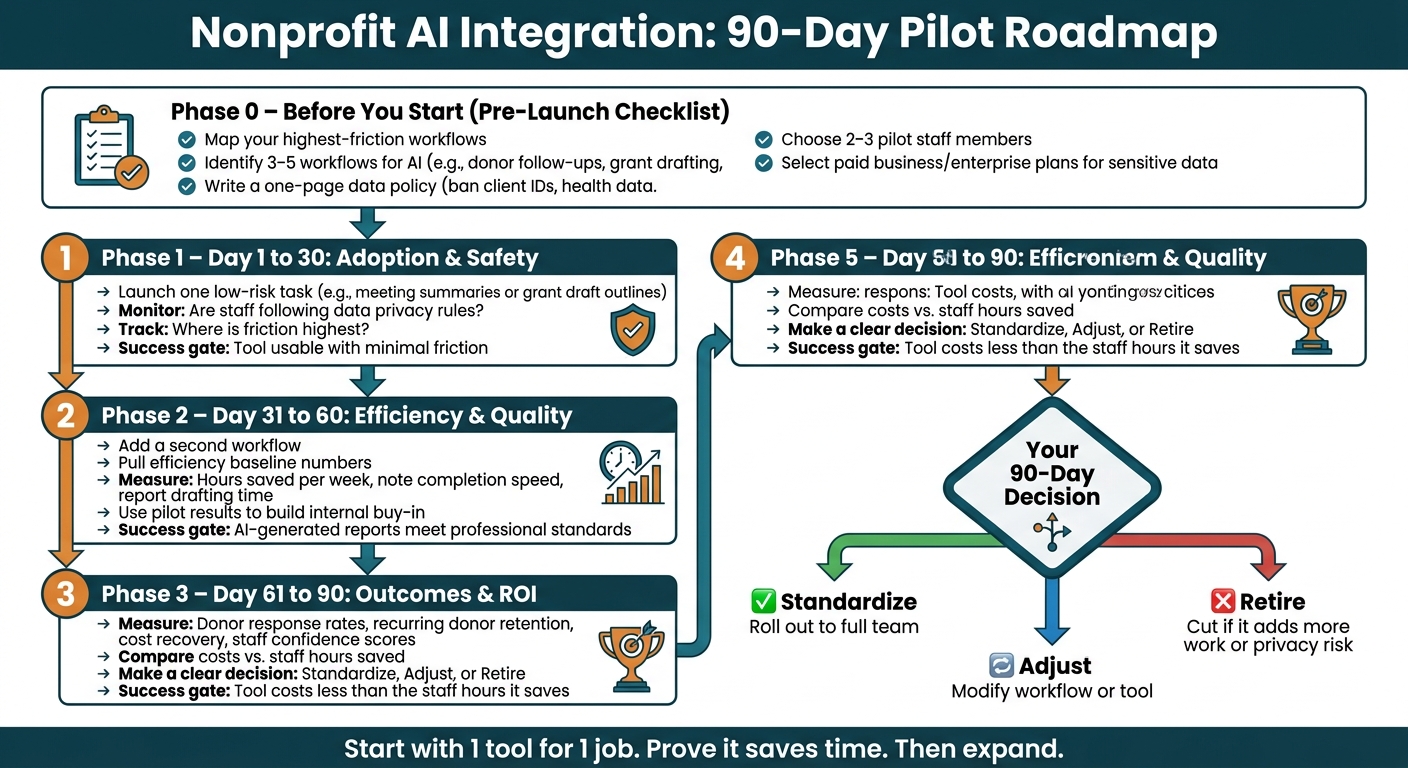
Nonprofit AI Integration: 90-Day Pilot Roadmap
AI for Nonprofits: A Practical (and Honest) Guide to What's Working Now
1. Audit your current tools and pick the right AI starting points
Start with the workflows that eat the most time or carry the most risk.
Map your nonprofit tech stack and daily workflows
Before you buy anything new, make a list of every tool your team uses. Then sort them into four buckets: communication, donor and program management, project operations, and fundraising tools.
After that, look for the spots where staff get stuck doing the same work again and again. That usually means summarizing notes, drafting follow-ups, tracking volunteer hours, and routing approvals. On a lean nonprofit team, app switching adds friction fast. The goal isn't more software. It's more time for clients, donors, and programs.
When the biggest bottlenecks are clear, match each one to the lightest tool that can fix it.
Match AI categories to each workflow
Different workflows call for different kinds of AI. General assistants like ChatGPT Plus ($20/month) or Claude are good for drafting, brainstorming, and summarizing internal documents. Collaboration tools like ClickUp AI or Microsoft Copilot are a better fit for meeting recaps, task assignments, and project updates because they stay inside tools your staff already uses. Nonprofit CRM platforms like Bloomerang or Virtuous go a step further by flagging at-risk donors and helping teams prioritize outreach.[5] And for frontline staff dealing with hard client conversations, coaching-focused platforms cover a gap that general assistants just don't handle well.
A simple rule works here: pick one tool for one job. Then expand only when the results are clear.
For most U.S. nonprofits, a smart place to start is 3 to 5 workflows where AI can save the most time or cut risk. Good early picks include:
- donor follow-up communications
- grant proposal drafting
- meeting transcription and summaries
- intake documentation
- staff coaching prep
Compare tools by fit, privacy, and integration depth
One of the biggest choices is whether to use native AI or a standalone tool. Native AI, like Bloomerang's Penny or ClickUp AI, cuts down on app switching and keeps data in one platform. Standalone tools like Grantable or Krisp ($8/month) are more specialized, but they also mean one more login and one more data silo.[4]
Privacy matters too. Free consumer tiers of ChatGPT and Claude train on your inputs by default unless you turn that setting off yourself. If your team handles sensitive data, use paid business or enterprise tiers instead.[1][5]
Use this quick comparison to narrow your first shortlist.
| Tool Category | Examples | Setup Effort | Data Control | Fits Existing Workflows |
|---|---|---|---|---|
| General Assistants | ChatGPT Plus, Claude | Very low | Low on free tiers | Minimal - copy/paste only |
| Collaboration AI | ClickUp AI, Microsoft Copilot | Low | Medium–High | Strong - lives inside existing tools |
| Nonprofit CRM AI | Bloomerang, Virtuous | Medium | High | Strong - built into donor workflows |
| Specialized AI | Grantable, Krisp | Medium | High | Moderate - task-specific integrations |
| Coaching & Client Interaction AI | Personos | Low | High | Strong - designed for casework and team dynamics |
For staff-facing roles, the right AI should support judgment, not just speed up document work. That's where the choice can shift. For frontline teams, Personos serves a different purpose: real-time, personality-aware guidance for hard client interactions and high-stress team dynamics.
2. Build an implementation plan with privacy, governance, and staff buy-in
Once you've mapped your workflows and narrowed down your tool list, the next move is simple: roll this out in a way that protects sensitive data and doesn't bury your team.
Set rules for client data, consent, and human review
Start with a short written policy. It does not need to be long. A one-page document is enough.
Ban client identifiers, health data, gift amounts, and identifiable case notes; require human review for any donor-facing message, grant submission, or impact claim. That one rule set gives staff room to move fast without putting sensitive records at risk.
For sensitive data, use paid business or enterprise plans. Never paste client data into consumer plans. Access controls matter too. Set role-based access by job function and keep an audit trail.
Use a phased rollout to reduce fear and build emotional resilience
Rolling out AI across the whole organization in one shot is one of the fastest ways to stall adoption. A phased approach lowers stress and gives staff time to build habits that last.
Start with 2 to 3 staff members on one low-risk task, such as meeting summaries or grant draft outlines. Run the pilot for 30 days and track time saved. If it does not cut manual admin time within 30 days, it is probably too complex for your team's current capacity.
At 60 days, add a second workflow and use the pilot results to help make the case inside the organization. By 90 days, you should have enough data to decide what to standardize and what to expand next [6][7]. Start small, prove it works, then grow from there.
Pick coaching support that helps staff adopt AI without burning out
Technical training by itself does not drive adoption. Frontline staff, like case managers, social workers, and program coordinators, are already stretched thin. If AI feels like one more thing on the pile, most people will tune it out. Tools tend to stick when they help with tough human moments, not just admin work.
The table below compares governance and adoption strengths across tools often used by nonprofits.
| Tool | Privacy Controls | Consent Model | Auditability | Staff Support | Best Fit |
|---|---|---|---|---|---|
| Salesforce NPSP | Enterprise-grade security | Complex/customizable | Full audit logs | AI-driven insights | Large orgs ($5M+) |
| Virtuous | High, nonprofit-specific | Integrated marketing | Activity tracking | Responsive automation | Relationship-focused, mid-market |
| ClickUp AI | High role-based access | Task-based permissions | Task/doc history | Writing and summary help | Project management |
| Personos | Privacy-first design | Consent-based coaching relationships | ActionBoard progress tracking | Real-time, personality-aware guidance for hard conversations | Frontline staff and supervisors |
Personos fits frontline coaching better than admin automation. Unlike Salesforce NPSP or Virtuous, which are not designed for crisis conversations or difficult feedback, Personos uses personality profiles grounded in the Five Factor Model to deliver guidance specific to the people involved. That makes it a fit for the human side of nonprofit work, where admin automation alone is not enough.
With governance and rollout in place, the next step is connecting AI to the tools staff already use every day.
3. Connect AI to the tools nonprofit teams already use
With governance in place, the next step is simple: connect AI to the tools your team already uses every day. As you hook each system together, stick to the same privacy rules from Section 2.
Add AI to Slack, Teams, Zoom, and Google Workspace
The fastest wins usually come from AI inside the tools staff already open every morning. Google Workspace for Nonprofits and Microsoft 365 Nonprofit both include AI in Docs, Gmail, Sheets, Word, Excel, Outlook, and Teams, with nonprofit pricing on eligible plans. [1][7]
In Slack, AI can sum up long channel threads and pull action items into task managers like ClickUp. [4] For meetings, tools like Krisp, Sembly, and Otter add transcription, summaries, and action items inside Zoom and Teams. [4][2]
Once those low-friction tools are working, move to the systems that store donor and program data.
Connect AI with donor, volunteer, and program management systems
CRM and program tools make AI more useful because they store donor and service context.
Salesforce Nonprofit Cloud includes Agentforce, which offers AI features that score gifts and draft proposals from org data. [5] Eligible nonprofits can get 10 free licenses through the Power of Us Program. [4] Virtuous’s Momentum feature flags which donors need attention and lines up personalized email drafts based on engagement signals. [5]
For smaller teams, Bloomerang’s Penny answers donor questions and drafts outreach, while Neon CRM offers AI profile summaries with an account-wide AI opt-out setting. [5]
One rule from Section 2 still matters here: never paste donor names, gift amounts, or health data into a free consumer chatbot. Use paid business or enterprise tiers with written agreements that say your data will not be used to train models. [1]
The same idea carries into supervision and client coaching, where context often matters more than speed.
Use personality-aware AI for coaching, supervision, and difficult client interactions
General assistants like ChatGPT and Claude can help role-play a tough conversation or adjust the tone of a message. Specialized meeting tools like Krisp, Otter, and Sembly handle the admin side of supervision by transcribing meetings and surfacing action items. For frontline coaching and client work, personality-aware tools add an extra layer of context.
Personos is built for helping professionals. It uses personality profiles and context to guide difficult conversations, crisis response, and team collaboration in real time. Its ActionBoard turns those insights into trackable next steps.
| Platform | What it's best for | Context it uses | Workflow fit |
|---|---|---|---|
| General assistants | Drafting, role-play, and ideation | General knowledge; manual prompting required | User-prompted |
| Meeting assistants | Transcription, summaries, and action items | Audio and meeting history | Runs during meetings; summarizes after |
| Personos | Coaching, supervision, and difficult interactions | Personality profiles plus relationship and context data | Real-time coaching with trackable next steps |
Use these integrations to create the actions and reports you’ll measure after launch.
4. Track staff and client outcomes after launch
After AI is built into Slack, your CRM, and meeting tools, use those same systems to measure results. The goal is simple: check whether AI saves time, improves work quality, and helps clients.
Define success metrics before you scale
Before you roll out any AI tool to more staff, lock in your baseline numbers. If you skip that step, you won't be able to show value to funders or compare results over time.
Measure the workflows you automated, including notes, follow-ups, reporting, and coaching. The most useful metrics usually fall into four buckets:
- Staff efficiency: hours saved per week, note completion speed, and time spent on manual reporting
- Staff confidence and supervision quality: staff confidence in difficult conversations, team satisfaction scores, and reduction in interpersonal conflict
- Client outcomes and donor engagement: donor response rates, recurring donor retention, beneficiaries served, and cost recovery
- Funder reporting: time to draft board or grant reports and accuracy of outcome summaries
Start with the pressure points AI is supposed to ease: burnout, manual reporting, and lack of automation.
Then tie each metric to a program goal or grant requirement, especially for the workflows you've already automated: donor follow-up, grant drafting, meeting summaries, intake documentation, and coaching support. If a funder expects quarterly outcome reports, measure how long those reports take to draft before and after AI. That gap becomes your proof of impact.
Turn AI outputs into trackable actions and reports
AI summaries and recommendations only matter when they lead to action. Move AI outputs into ClickUp, Asana, or Salesforce so tasks can be assigned and tracked.
For frontline coaching and difficult interactions, Personos turns AI output into tracked development steps. Its ActionBoard lets practitioners turn chat messages, report sections, or prompts into tasks. Coaches can also see progress for the staff or clients they support, which creates a documented trail of development milestones.
For funder reporting, use AI to summarize program activity from task descriptions and meeting notes into a draft board update. But treat every AI-generated report as a draft that needs human review before it goes out. That human-in-the-loop step protects your credibility and helps keep the content accurate. [3][1]
Review results at 30, 60, and 90 days and decide what to expand
Use a fixed review cadence so results stay tied to the pilot, not hype.
| Review Point | Primary Focus | Key Questions |
|---|---|---|
| 30 days | Adoption & safety | Are staff following data privacy rules? Where is friction highest? |
| 60 days | Efficiency & quality | How much time is being saved? Are AI-generated reports meeting professional standards? |
| 90 days | Outcomes & ROI | Are client and donor metrics improving? Does the tool cost less than the staff hours it saves? |
At 30 days, focus on catching problems early. Check that the pilot group can use the tool with minimal friction. [1]
At 60 days, pull your efficiency numbers and compare them with your baseline.
At 90 days, make a clear call: standardize, adjust, or retire. If a tool creates more work than it saves, or if it adds privacy risk your team can't manage, cut it. Budget limits and staff workload should be part of that decision too. [1]
Conclusion: A clear path to responsible AI integration in nonprofits
Responsible AI integration doesn’t start with picking a tool. It starts with seeing where your team is losing time and energy right now. The aim isn’t to pile on more software. It’s to connect the right tools so they actually work together.
Start by mapping your highest-friction workflows. Then match AI to the specific tasks that are slowing people down. Once those pressure points are clear, put guardrails in place so adoption stays safe.
A one-page policy on approved tools, allowed data, and required human review keeps AI safe and usable.
From there, pilot one workflow with a small team. Expand only if it saves time and improves quality. For frontline roles, coaching tools matter just as much as admin automation. For case managers, social workers, supervisors, and crisis conversations, Personos adds real-time, personality-aware guidance and tracks progress toward practitioner goals.
The nonprofits that get the most from AI connect the right tools, keep humans in the loop, and measure what changes for staff and clients.
FAQs
How do we choose our first AI workflow?
Start with the manual task that eats up the most time, whether that’s grant writing, donor communications, or data entry. Then pick one specialized tool that works with your current stack.
Test it with two or three staff members first. Read the privacy terms, especially whether the tool trains on your data, and put a simple one-page policy in place.
If your work includes complex client dynamics, Personos may help with real-time, situation-specific guidance.
What data should staff never paste into AI tools?
Staff should never paste sensitive information into public, free consumer AI tools. That includes donor names, gift amounts, addresses, health details, and confidential beneficiary data.
Here’s the problem: many of these tools use what people type into them for model training by default. And that can create serious privacy risks.
For critical data, use only enterprise or business tiers that explicitly state your data will not be used for training. Personos also masks identifying information before it reaches the AI.
How can we tell if an AI pilot is worth expanding?
Set clear success metrics and an evaluation timeline before the pilot starts. Focus on outcomes you can track, like time saved, better accuracy, or more outreach capacity. During the pilot, document both wins and setbacks so you have a clear record of what happened.
At the end, review the results against your goals. If the outcomes are consistent and line up with what you wanted, expand. If the results are mixed, refine the approach or pause. If the results are poor, end the pilot and redirect resources.