AI Scenario Planning for Nonprofit Growth
Build 2-4 AI-driven what-if scenarios, set tripwires, and link forecasts to budgets, staffing, and KPIs for nonprofit resilience.
Christian Thomas

AI Scenario Planning for Nonprofit Growth
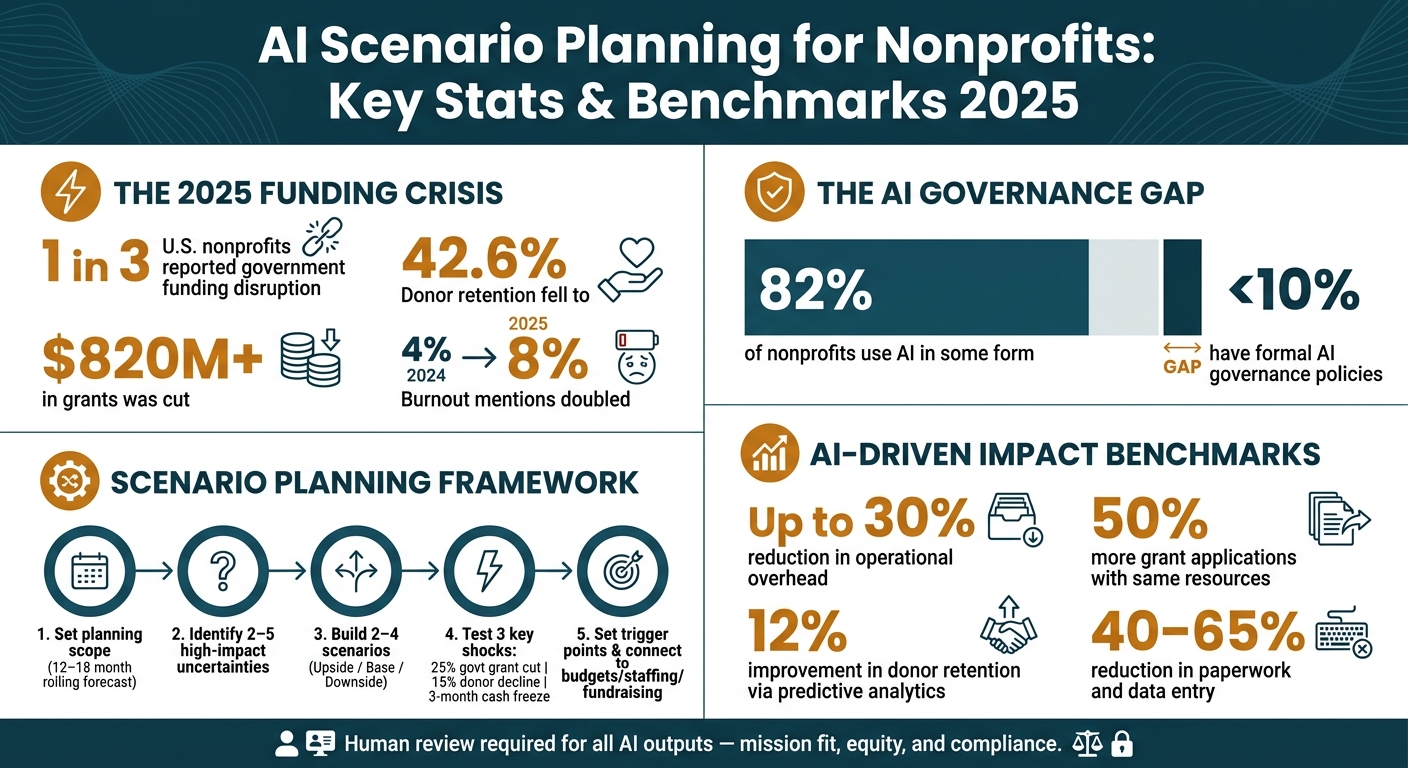
If your nonprofit waits weeks to update budgets, you're already behind. In 2025, 1 in 3 U.S. nonprofits reported government funding disruption, more than $820 million in grants was cut, and donor retention fell to 42.6%. My takeaway is simple: I need a way to test funding shocks, staffing strain, and program tradeoffs before they hit.
Here’s the core idea in plain English: I can use AI to build a small set of what-if scenarios, track early warning signs, and link each scenario to clear budget and staffing actions. That means less time stuck in spreadsheets and more time making calls while there is still room to act.
What this article covers:
- How I set a tight planning question for the next 12 to 18 months
- Which data I need before I model anything
- Why privacy rules, source tracking, and human review matter
- How I pick 2 to 5 high-impact uncertainties
- How I turn those into 2 to 4 usable scenarios
- Which numbers to test, including:
- 25% government grant cut
- 15% donor decline
- 3-month cash flow freeze
- How I connect scenarios to budgets, hiring, fundraising, and board updates
- Which KPIs show whether the process is working
A few points stand out. AI is not there to make the final call. People still do that. AI helps me sort data, draft scenario paths, flag donor or cash flow risk, and update forecasts more often. But every output still needs review for mission fit, equity, compliance, and plain common sense.
The main lesson: keep the model small, set trigger points in advance, and review results every quarter. That is how scenario planning becomes something my team can use, not just another document no one opens again.
AI Scenario Planning for Nonprofits: Key Stats & Benchmarks 2025
Build the Foundation Before You Model Scenarios
Set Your Planning Scope, Time Horizon, and Growth Question
Before you open any AI tool, get clear on the decision you want help making. If the goal is fuzzy, the scenarios will be fuzzy too. AI does its best work when the question is specific, like go or no-go, A vs. B vs. C, or best-case vs. worst-case outcomes [3].
Keep the scope tight. Focus on the variables that have the biggest effect on your finances and day-to-day work when conditions change, such as funding sources, active programs, and client demand [1]. Spell out the mission-critical programs, values, and roles you will protect in every scenario. Then frame the growth question around your mission and theory of change, not only revenue [3][6].
Use a rolling 12-to-18-month forecast and set tripwires that trigger action, such as reserve thresholds [5][7][9].
Once the question is clear, move to the less glamorous part: cleaning the data and setting ground rules.
Prepare Your Data, Governance, and Ethical Guardrails
AI can only work with what you give it. For scenario modeling, that usually means outcomes, revenue, expenses, staffing, caseloads, donor trends, and community indicators [4]. If that information is scattered across separate spreadsheets and formatted in different ways, fix that first.
Privacy compliance isn't optional. Depending on your work, that may include HIPAA, FERPA, state privacy laws, and OMB Uniform Guidance [4]. Client data should never go into an AI tool unless the right safeguards are in place.
The governance gap in the sector is hard to ignore. 82% of nonprofits use AI in some form, yet fewer than 10% have formal AI governance policies [4]. And every number that shows up in a board deck or grant report needs a source a person can trace and understand. AI output by itself will not meet audit or grant rules [4].
"The organizations that navigate the 2025 funding crisis best won't be the ones with the most sophisticated AI. They'll be the ones whose finance infrastructure finally got out of the way." - Paul Lynch, CEO, Centage [4]
When the data is clean and the rules are clear, your team can build scenarios leaders can trust.
Build Staff Readiness Without Overwhelming Your Team
Staff burnout is already a major issue. Mentions of burnout in the nonprofit sector doubled from 4% in 2024 to 8% in 2025 [4]. So if you drop a new AI planning process on a team that's already stretched thin, don't be surprised if people push back.
A phased rollout makes more sense. Clean up the tools and data first. Then pilot AI forecasts alongside manual planning for one quarter [5][7]. Think of AI as a drafting partner. Give it context, source documents, and feedback.
It also helps to bring in people from across the organization early. Program staff know caseload patterns. Development staff know donor relationships. Operations staff know where work gets stuck. If those voices aren't part of the process, the model may look neat on paper and still miss what's happening on the ground.
"Not only can it lessen the number of tasks, but it can also increase the space for strategy. And if you increase the space for strategy, you create an opportunity for leveraging the talent that you have." - Mike Mitchell, Managing Partner, Nonprophet AI [6]
With that groundwork done, you're ready to model the small set of scenarios that matter most.
Design AI-Driven Scenarios Your Nonprofit Can Actually Use
Identify the Drivers, Assumptions, and Key Uncertainties
Once your scope, data, and guardrails are set, cut the model down to the few drivers that can change decisions. A good way to do this is to sort drivers into funding, programs, and operations, then keep only the 2 to 5 variables with the biggest impact and the most uncertainty [10].
Next, plot each driver on an impact vs. uncertainty matrix. The rule here is pretty simple: if a driver is not both high-impact and high-uncertainty, it probably doesn't belong in the model [10]. That keeps the work focused on the pressures most likely to affect your next move.
AI can help here, too. It can group historical drivers and surface patterns, which makes it easier to rank the uncertainties that belong in the model [7][8].
Draft 2 to 4 Plausible Scenarios With AI and Human Review
From there, turn those drivers into a small set of distinct futures. Build 2 to 4 scenarios. That is usually enough to show tradeoffs without making the process messy or hard to use [3].
The simplest setup is often the best:
- Upside
- Base
- Downside
If you're weighing one big choice, you can also frame scenarios as Go/No-Go or Option A vs. Option B vs. Option C [3]. Either way, each scenario should paint a clear picture of how your organization would operate under that set of conditions.
"The goal of scenario planning is not to predict the future but to prepare for a range of possibilities." - Justin Croft, QueBIT [2]
Generative AI can draft the story for each scenario using your drivers and past data. That can save time. But human review is non-negotiable. Leaders still need to check each draft for mission fit, equity impact, and value alignment, because AI cannot judge those on its own [10]. A scenario may look workable on paper and still be the wrong move if it weakens a core program.
Before you lock anything in, set a trigger point for each scenario. This should be a specific, measurable signal that tells the team when to act. For example: "If revenue drops below X by date Y, implement Scenario C." Vague triggers tend to fall apart when stress hits [10][3].
Quantify the Financial, Staffing, and Program Tradeoffs
Now put numbers behind each scenario so leaders can compare options fast [3].
| Metric Category | What to Quantify |
|---|---|
| Financial | Annual revenue (USD), months of cash reserves, cost per client |
| Staffing | FTE needs, staff turnover rate, caseload per staff member |
| Program | Outcomes per $1,000 invested, total beneficiaries served, waitlist length |
| Risk | Share of revenue by funder, unrestricted net asset safety net |
Start with your current operating budget as the baseline, then adjust the big line items for each scenario [11]. You do not need fancy software for this. A spreadsheet is enough.
What matters is that you account for ripple effects. Cutting a program coordinator may save money in the short term, but it could also lead to the loss of a performance-based contract [3]. That kind of second-order effect is where scenario work earns its keep.
At a minimum, test these three shocks:
- a 25% government grant reduction
- a 15% individual donor decline
- a three-month cash flow freeze [4]
Running these numbers before a crisis gives your team something far better than guesswork. It gives them a plan they can use when the pressure is on. Those figures then feed into budget, staffing, and fundraising choices.
Put Scenario Planning to Work in Day-to-Day Operations
Connect Scenarios to Budgets, Staffing Plans, and Fundraising
Once your scenarios are mapped out, the next step is simple: tie them to how you budget, hire, and fundraise.
Instead of leaning on a once-a-year budget, move to a rolling 12- to 18-month forecast that gets updated every month with actual results and revenue probabilities [9][5]. That gives you a live view of what’s changing, not a static plan that gets old fast.
It also helps to sort expenses into fixed, semi-variable, and variable buckets. When funding shifts, that setup makes it much easier to decide what can stay, what can flex, and what needs to pause [9].
Then give each scenario its own action set with a Must Do, Won't Do, Might Do framework [13]. This turns scenario planning from a planning exercise into a ready-to-use response plan. Say reserves fall below 90 days of operating expenses. That tripwire can trigger a pre-approved move right away, instead of forcing a rushed debate in the moment [9][14].
Program managers should also have real-time budget dashboards so they can track grant burn rates without sending extra requests to finance every time they need an update [4]. That cuts back on back-and-forth and gives the finance team more room to focus on planning.
Use AI for Rolling Updates and Early Warning Signals
After the operating plan is in place, AI can help you spot signs that one scenario is starting to play out.
The goal is to catch shifts 3 to 6 months before they hit your bottom line by watching leading indicators like monthly donor retention, grant renewal probability, and real-time service demand spikes, instead of waiting for year-end totals [7][5][8].
Set alerts around threshold breaches. If donor retention falls below target, or expected grant revenue doesn’t arrive by a set date, leadership should hear about it right away, not at the next monthly meeting.
"The organizations that navigate this environment will be those whose CFOs can model scenarios in real time, not six weeks later." - BDO 2024 Nonprofit Sector Report [4]
AI can also support predictive cash flow by looking at payment cycles and donation patterns to estimate your cash position 6+ weeks ahead [12]. That extra lead time can make all the difference when cash gets tight.
Support Communication, Change Management, and Burnout Prevention
Forecasts only help if boards and staff trust them enough to act on them.
Joint planning sessions give boards and staff a chance to share operating data, pressure-test assumptions, and stay aligned on the same playbook [9]. It also helps to decide ahead of time who gets notified when a forecast shifts in a big way, so you avoid rumors, confusion, and crossed wires [7].
When you use AI, make sure the outputs explain why a forecast changed, not just what changed. If a board member asks why donations are projected to drop, a reason like declining engagement metrics for a key donor segment is much more useful than a black-box answer [7]. People are far more likely to act when they can see the logic.
Communication tools matter on the people side too. For teams dealing with conflict, trust issues, and burnout, Personos adds personality-aware guidance for difficult conversations and collaboration.
Measure Results, Improve the Process, and Pick the Right Tools
Track Impact With Practical Nonprofit Metrics
Use the same scenarios and triggers to check whether your plan is leading to better decisions, not just more activity.
Start with financial resilience. Look at operating reserve levels, unrestricted net asset strength, and whether cost per outcome is moving in the right direction. Automation can cut operating costs by up to 30% [5]. In fundraising, track donor retention, recurring donor growth, and grant applications submitted. Predictive donor analytics can improve donor retention by an average of 12% [5]. A solid working target is to submit 50% more grant applications without adding the same amount of staff time [5]. On the staffing side, measure how much administrative time is being freed up, and whether those hours are being shifted to mission-critical work. AI note-taking and automation can reduce paperwork burdens by 40% to 65% [5].
That’s the bigger change here. You’re moving away from simple activity counts and toward impact results: cost per outcome, long-term community outcomes, and whether mission impact is growing faster than total expenses [6][7]. For decision quality, track forecast accuracy, forecast stability, and decision speed, meaning the time from trigger to action [7]. If you set triggers earlier in the planning process, review whether they fired when they should have and whether the pre-approved response actually worked.
Use this table as your quarterly review checklist.
| KPI Category | Metric to Track | Target Benchmark |
|---|---|---|
| Financial | Operating reserve levels and unrestricted net asset strength | Months of cash on hand; capacity to weather a specific deficit level [3] |
| Financial | Cost per outcome | Up to 30% reduction in operational overhead [5] |
| Fundraising | Donor retention rate | 12% improvement via predictive analytics [5] |
| Fundraising | Grant applications submitted | 50% more applications with the same resources [5] |
| Staffing | Admin time savings | 40–65% reduction in paperwork/data entry [5] |
| Decision Quality | Forecast accuracy | Variance between AI prediction and actuals [7] |
| Mission | Impact results | Growth in impact vs. growth in expenses [6] |
Refine Your Assumptions, Prompts, and Models Over Time
Scenario planning gets better when you treat it like a living process instead of a once-a-year event.
Each quarter, compare what happened with what each scenario predicted. Pay close attention to categories that keep missing the mark. Individual giving and grants, for example, often move in different ways and may need separate models [7]. If you’re early in the rollout, run AI forecasts alongside manual methods. That gives you a side-by-side view of accuracy and helps your team build trust before making a full switch [7]. You can also use AI for variance analysis and to sort one-off anomalies from patterns that show the model needs to change [7][4].
On the AI side, persistent context features can save a lot of time. Claude's Projects, ChatGPT's GPTs, and Gemini's Notebooks let you store your organization’s history, past reports, and planning assumptions [6]. That way, you don’t have to re-explain everything every time you start a new planning session. One simple tactic is to paste in a prompt that worked well and ask the AI how to make it more precise next time [6].
Use quarterly reviews to tighten your assumptions, prompts, and model structure.
In early 2026, the Karsh Social Service Center in Los Angeles refined its strategic plan using a custom AI "command center." Executive Director Lila Guirguis used a virtual strategic-planning coach to iterate on organizational goals, specifically instructing the AI to avoid clichés and keep the plan tied to impact data rather than counting inputs [6].
Compare AI Tools for Nonprofit Scenario Planning
Match each tool to the job it needs to do: drafting, forecasting, or staff execution.
General-purpose AI tools like ChatGPT and Claude work well for drafting scenarios and narrative reports. They’re flexible, but they still need your context and clear guardrails. If your planning leans heavily on finance, pay close attention to explainability, auditability, and traceable sources behind any AI-generated numbers.
Financial planning platforms make more sense when you need forecasting, reporting, and restricted-fund visibility. They’re built for the budget side of scenario planning, especially when boards and finance teams need a clear line from assumptions to numbers.
Personos fills a different role. It supports staff execution through client conversations, team collaboration, and burnout prevention, while forecasting tools focus on the numbers. If your scenario plan depends on whether people can actually carry it out day after day, that people-centered layer matters.
| Tool Type | Best For | People/Team Support |
|---|---|---|
| ChatGPT / Claude | Scenario drafting and narrative reports | Requires your own context and guardrails |
| Financial planning platforms | Forecasting, reporting, and restricted-fund visibility | Limited |
| Personos | Staff dynamics, client communication, and burnout prevention | Strong |
If you’re just getting started, begin with a general-purpose AI tool to draft your first scenarios and set a baseline. As your planning process gets tighter, add financial planning software where you need more control over forecasting and reporting. And if staff retention, burnout, or hard client interactions are already putting pressure on your team, Personos is worth looking at alongside the forecasting stack. Not as something to bolt on later, but as the execution layer that helps people follow through on the plan.
AI Readiness for Nonprofits: A Practical Guide
FAQs
How can a small nonprofit start scenario planning with limited staff?
Start simple. Use a whiteboard or spreadsheet to map the main drivers, like funding sources and client demand.
Then move through the core steps: set guiding principles, flag the highest-risk drivers, build best-, moderate-, and worst-case scenarios, and create action playbooks for each one.
If your needs get more involved, AI tools can help speed up modeling and budgeting. And Personos can support staff as they handle team coordination and the people side of crisis-driven change.
What data should I gather before using AI for scenario planning?
Gather internal and external data. Start with historical financials, program performance, and the main operational drivers, such as staffing capacity, client demand, and revenue streams.
Then bring in outside factors like economic indicators, community demographics, and donor behavior. If it makes sense for your setup, tools like Personos can add extra insight into staff and stakeholder interactions.
The main goal is simple: keep everything organized. When your data is clean and structured, AI can model best-, moderate-, and worst-case scenarios with far better accuracy.
How do I keep AI scenario planning compliant and trustworthy?
Keep AI scenario planning compliant and trustworthy by pairing data-driven modeling with human oversight. Your board should define decision thresholds and contingency triggers, so automated recommendations stay in line with your mission and risk tolerance.
Draw a clear line around what the system won’t do. Share assumptions and contingency plans openly, and use AI to support human judgment, not replace it, as conditions shift.