7 Features Teams Need in AI Communication Coaching
How to test seven essential features of AI communication coaching to improve behavior while protecting privacy and trust.
Christian Thomas

7 Features Teams Need in AI Communication Coaching
I’d choose AI communication coaching by testing what it helps people do, not how polished its advice sounds. Start with three to five workplace scenarios, check who can read practice sessions, and measure behavior before expanding access.
Here are the seven features I’d check:
- Personality profiles that guide tone and pacing without labeling people.
- Conversation-specific guidance that accounts for goals, roles, and current constraints.
- Interactive practice with retries and feedback on listening, questions, tone, clarity, empathy, and follow-through.
- Short prompts that turn advice into one action.
- Goals and progress tracking tied to behavior, not chat volume.
- Privacy and access controls that keep employees in charge of what they share.
- Team reports and administration that show patterns in behavior without exposing private coaching details.
My test is simple: Does communication improve without weakening employee trust? For example, a hypothetical four-week pilot could target moving from 40% to 80% of discussions ending with a named task owner and deadline. That’s a test goal, not a promised result.
I’d use the same checks for Personos or any other tool. <u>Product descriptions are a starting point, not proof</u>. Ask vendors to show how practice, follow-up, permissions, and human support work before rolling out access.
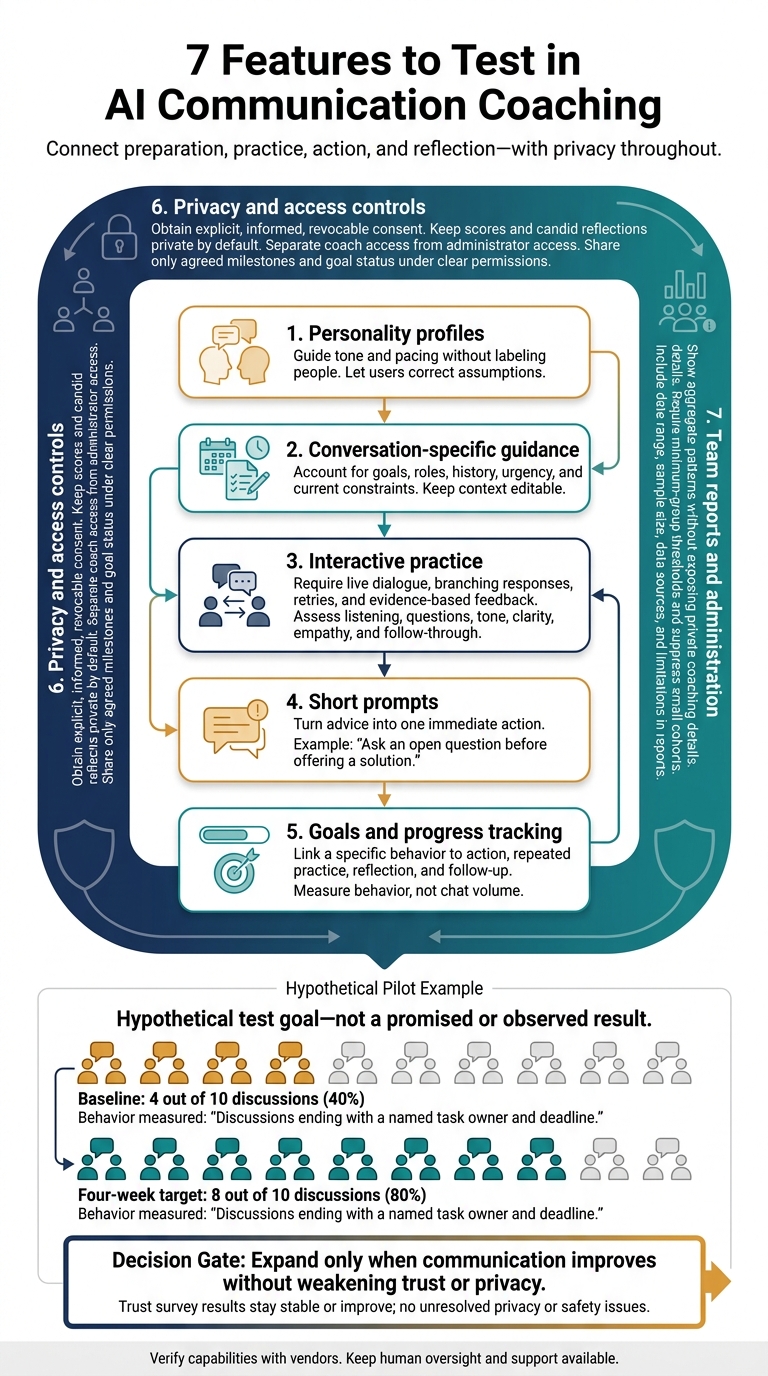
7 Features to Test in AI Communication Coaching
Best AI coaching software in 2026
What AI Communication Coaching Should Do
Coaching should connect preparation, practice, action, and reflection. Before giving advice, the tool should ask about the conversation’s goal, participants, urgency, and constraints. It should help users rehearse, choose an approach, and reflect afterward. For growing teams, this keeps coaching consistent across managers and situations.
Follow-through means saving the goal, recording the outcome, and setting a follow-up action. Measure observable behaviors, not changes in personality scores. These requirements guide the features below.
Employee development and organizational oversight need separate rules. Teams won’t adopt coaching tools that blur support with surveillance. Before anyone uses the tool, explain whether coaching data can affect performance reviews. Assign clear human responsibility for harmful advice and high-stakes uses. Clear roles and documented human oversight are central to sound AI governance.[3][4] The features below should work within those rules, not around them.
Personality profiles should suggest options, not define ability, motivation, diagnosis, or risk. Users should be able to correct assumptions and add context. Recommendations should account for behavior and context rather than treat trait scores as fixed predictions.[5][6][7] Profiles should help with the next conversation, not label the person.
AI suggestions are drafts for human judgment, not substitutes for qualified human support. For threats, self-harm, abuse, medical danger, or immediate safety concerns, the tool should direct users to crisis procedures and qualified support. Urgent risk calls for an immediate handoff to human support.[8][9] The next sections show what to check in each feature.
1. Personality Profiles for Communication
First, test whether the tool turns personality data into practical communication guidance. Use profiles to guide communication, not to define people. They should help teams adjust pacing, feedback style, motivation cues, and collaboration norms.
Personos adds 30-trait profiles, plus relationship and group insights. Teams can use these to test whether recommendations fit each person’s role, workload, culture, and current situation.[1][2] That guidance should help during live conversations, not just look good in profile summaries.
When discussing Jordan’s missed handoff, a manager can still use the same facts and expectations; personalization should only change pacing, tone, and delivery.
Ask the vendor for evidence that its guidance improves feedback quality, conflict resolution time, employee experience, or goal completion. If it holds up under actual workload and tension, move to the next test: context-based coaching for specific conversations.
2. Guidance for Specific Conversations
Look for advice that fits the conversation’s purpose, not just the people involved. The user’s role, relationship, history, goal, current constraints, and communication preferences should shape the wording, tone, and next step.
Hypothetical workflow: A case manager uses Personos Chat to prepare for a discussion about missed housing appointments and transportation barriers, requesting an opening, barrier-focused questions, and one next step. The test is whether the guidance addresses barriers, not blame.
Ask the tool to explain its recommendation and offer alternatives when its response changes. Personos supports follow-up “what if” questions through its “Discuss in Chat” feature. Practitioners should adjust suggestions to the client’s stated preferences, agency policy, and safety needs rather than follow a fixed script. The guidance should also be easy to rehearse before the actual conversation.
As caseloads grow, advice needs to reflect changing circumstances. Keep context editable, source-tagged, and dated so staff can correct outdated assumptions.
3. Conversation Practice With Feedback
Once users have advice, they need a chance to practice it. Look for interactive rehearsal, not just lessons or sample scripts. The AI should respond to what learners say, allow retries, and explain what to change. A simulated colleague should react differently as the conversation unfolds, becoming uncertain, apologetic, guarded, or withdrawn rather than following a fixed script.
Test this with one workplace scenario.
Hypothetical practice: Rehearse a missed-deadline discussion in three rounds. First, ask what blocked the work without assigning blame. Next, practice reflecting the colleague’s explanation before suggesting a solution. Finally, agree on the remaining work, its owner, a revised Friday deadline, and a check-in time. Increase the difficulty by introducing competing priorities or a defensive response.
Feedback should score listening, questions, tone, clarity, empathy, and follow-through, with evidence from the exchange. Did the learner summarize the explanation accurately? Ask open questions? Acknowledge pressure while holding the colleague accountable? Confirm who will do what and when? Require one concrete revision after each attempt. Specific feedback and repeated revision are central to deliberate practice.[10][11][12] Usable coaching should meet that standard.
As teams grow, private rehearsal can reduce managers’ workload while keeping basic coaching consistent. Managers can save live coaching for complex cases while AI handles low-stakes repetition and basic feedback. Compare attempts using the same behavior-based rubric, and save them for review. Treat AI feedback as guidance employees can challenge, not a final judgment of their skills. Keep human support available for sensitive conversations.
For Personos, verify live branching role-play separately. Check for live dialogue, branching responses, repeated attempts, and feedback on all six skills above. Conversational chat alone does not prove that the platform supports practice.
4. Short Prompts for Daily Coaching
After live practice, short prompts help people keep using the same behaviors between conversations. Each prompt should turn coaching into one immediate action. Personos Prompts offer guidance for individuals, relationships, and groups on daily, weekly, or monthly cycles. Users can regenerate prompts that don't fit and give thumbs-up or thumbs-down feedback to improve future relevance.
Hypothetical reminder: Ask an open question before offering a solution.
Set reminders around the behavior people need to practice: preparing for a difficult conversation, inviting more participation in meetings, acknowledging tension after an exchange, or defining next steps. Individual prompts can help someone pause before responding. Relationship prompts can support rebuilding trust, while group prompts can draw in quieter voices. When users regenerate guidance, it should fit the current situation without changing the coaching goal.
Start with one prompt before a recurring meeting. Add follow-ups and post-conversation reflection only if the team finds them useful. Check the timing, audience, delivery method, and whether users can snooze or dismiss reminders. As teams grow, this gives them a shared coaching baseline without another live session. Judge a prompt by whether it changes what people do next.
Run a four-week pilot that measures participation, documented next steps, and user-rated usefulness, not just reminder opens. Treat reminders as reinforcement, not proof of habit change.[13][14]
5. Development Goals and Progress Tracking
Once prompts help turn a behavior into a habit, progress tracking makes it measurable. Track a specific behavior, not a broad intention. A useful coaching system links a goal to action, repeated practice, reflection, and follow-up. That keeps development moving between conversations rather than leaving guidance buried in chat history.[15]
Personos ActionBoard turns guidance from Chat, Dynamic Reports, or Prompts into trackable actions with one click. Its Kanban-style planning and milestone tracking support deliberate practice.[2] For larger teams, this helps keep coaching consistent while preserving each person’s context.
Hypothetical goal: For the next four team meetings, end each discussion by naming one owner and one agreed deadline for every follow-up task. Prepare a closing question, record each assignment, and confirm it aloud. Set milestones for the first attempt, two consecutive meetings, and all four meetings. Give each follow-up task a due date and status; review completion at the next meeting.
Keep reflections brief: what happened, how the other person responded, and what needs adjusting. Review them with a coach or manager after two weeks. Keep candid reflections private. Share only agreed milestones and goal status under clear permissions. Check visibility before rollout rather than assuming all ActionBoard records have the same access settings.
Measure whether discussions include an owner and a deadline. This makes coaching progress visible across a growing team without turning tracking into surveillance. In the hypothetical pilot, a baseline of 4 out of 10 discussions could lead to a target of 8 out of 10 after four weeks, checked against selected meeting notes. Review on-time follow-ups, too. Opened chats and completed tasks show activity, not accountability. Since progress notes can reveal sensitive development details, the next check is who can view, edit, and export them.
6. Access Controls and Privacy
Once a tool stores goals and reflections, privacy rules determine who can see them. Get specific consent before collecting profiles or conversations. Explain what you collect, why, who can see it, how long you keep it, and whether it supports product improvement or AI training. Consent must be explicit, informed, and revocable. Keep permissions for assessment, coaching access, and team reporting separate.[17][18]
Keep scores private by default, and separate coach access from administrator access. Coaches should see only participants who have granted permission. Admins should manage billing, provisioning, retention, and permissions without reading scores or chats. Confirm that access can end when coaching ends and that the tool logs access and exports.[16]
Collect only the context needed for guidance. Limit free-text data, redact sensitive fields, and verify that customer data does not train shared models. Require encryption in transit and at rest, multifactor authentication, audit logs, vulnerability management, and an incident-response plan. Ask for written security evidence. A claim that data is “encrypted” isn't enough.[16][19]
Set retention periods for profiles, conversations, reports, logs, and backups. Confirm how the tool deletes individual records, user data, and workspace data, including when backup copies expire. Shared information should use links that expire.[17][18][20]
The same privacy rules apply to team reporting. Team reports must not identify people indirectly. Use aggregate trends instead of individual scores so growing teams can learn without exposing anyone. Require minimum-group thresholds and suppress small cohorts. A job title, location, or rare trait can identify someone even without a name. Test these safeguards with real cohorts before a broad rollout.[21][22]
7. Team Reports and Administration
Team reports should turn coaching activity into clear next steps. Check four reporting levels: individual, relationship, group, and organization-wide adoption. Every report should include its date range, sample size, data sources, and limitations. Treat self-reported concerns as input for coaching, not proof.[23][25]
Personos Dynamic Reports provide tailored personal, relationship, and group insights based on personality profiles and supplied context. Group context can include roles, norms, and decisions. These reports can support coaching discussions, but they don't prove enterprise reporting capabilities or behavior change. Check those separately.[2]
Ask vendors to demonstrate onboarding, group creation, role assignment, and separate permissions for reports and exports. Confirm that each role can access only the reporting level it needs. During the pilot, test onboarding, permissions, and how useful the reports are.[24][26]
Hypothetical coaching workflow: A group report flags unclear handoffs from user-supplied context. The team lead checks the finding with staff and introduces a handoff template covering ownership, deadlines, and completion criteria.
Track activated accounts, weekly active users, and completed practice sessions. Use these measures to spot where people need onboarding or coaching support, not to rank employees by chat volume. Before claiming that communication has improved, compare report themes with team feedback and work-quality measures.[23][25][26]
Use the table below to compare these features before a pilot.
Comparison Table: Features to Verify
Use this table to check whether features work as described, rather than just appearing in marketing copy. Capabilities vary by vendor and plan. Compare tool types across seven coaching features. Personos provides a specific reference, but its inclusion does not confirm availability.
| Feature | General-purpose AI assistants | Meeting-feedback tools | Personality-based coaching platforms | Personos |
|---|---|---|---|---|
| Personality context | Users supply context through prompts. | Focus on talk time, interruptions, and observable speech patterns. | Use structured personality assessments; models vary. | Chat uses a Five Factor Model profile: 30 traits on an 80-point scale. |
| Guidance for specific conversations | Flexible, user-directed advice based on supplied context. | Guidance tied to live or recorded meetings. | Personality-based guidance; depth of context varies. | Chat combines personality profiles with situational context. |
| Conversation practice | Informal role-play; structured feedback varies. | Review of real meetings. | Practice support varies; check scenarios and feedback. | Dedicated simulations unconfirmed. |
| Short prompts | May require manual reminder setup. | Live cues or post-meeting suggestions, which may not serve as coaching nudges. | Personalized coaching nudges; availability varies. | Prompts deliver short, actionable nudges. |
| Progress tracking | Manual tracking or separate tools. | Track speech trends rather than development goals. | Goal and milestone tracking varies. | ActionBoard tracks progress and development goals. |
| Privacy and access controls | Check retention, use of data for model training, and administrator visibility. | Check recording consent, transcript access, and audio deletion. | Check assessment confidentiality and permissions for sharing scores. | Consent-based score sharing. |
| Team reporting | Require custom setup for coaching-specific reports. | Aggregate meeting or speech trends. | Relationship or group insights; availability varies. | Dynamic Reports cover individuals, relationships, and groups. |
Note: Personos entries reflect product descriptions supplied for this article, not independent testing. Verify dedicated simulations, prompt customization and delivery controls, security controls, and enterprise reporting separately with the vendor.
Check how the seven features work together across preparation, practice, follow-up, and privacy. Ask vendors to demonstrate a repeatable practice session with feedback, record a goal and milestone, and show what happens when someone withdraws consent to share scores. A chat window alone does not prove role-play support. Consent-based sharing does not prove full privacy controls.
During procurement, confirm integrations, pricing, support, accessibility, bias testing, and contract terms. AI guidance should support professional judgment, not replace crisis protocols or human oversight.
Conclusion: Test the Features Before Expanding
After reviewing the comparison table, test one coaching workflow that can scale with a growing team. Profiles and context shape guidance, practice builds skills, prompts reinforce behavior, and goals track progress. Access controls and reports should protect privacy while showing patterns.
Start with a limited pilot, not companywide access. Choose three to five common workplace scenarios across roles that reflect your team.
Examples include giving corrective feedback, de-escalating an upset client, setting a boundary, handling resistance, or repairing a misunderstanding.
Before starting, define the pilot’s length, participating employees, approved scenarios, human supervision, support process, and stop conditions. Set a baseline for listening, clear requests, and follow-through. Survey employees before, midway through, and after the pilot about confidentiality, data visibility, and comfort with data handling.
For helping professionals, Personos fits only if it works in actual client and team scenarios. Test whether it improves communication and eases workload strain. Treat burnout reduction and client outcomes as results to test, not promises.
Expand only when the pilot shows better communication without weakening trust or privacy. Usage must stay steady, guidance quality must hold, and target behaviors must improve. Employee trust survey results should stay stable or improve, with no unresolved privacy or safety issues.
FAQs
How can small teams measure coaching results without exposing individuals?
Small teams can use tools like the Personos ActionBoard to track coaching progress and milestones while protecting privacy. Personos keeps raw personality data private, sharing only high-level insights. Before sending information to the AI, it masks identifying details with revolving placeholders.
Shared dashboards let teams show stakeholders measurable outcomes without exposing individual team members’ underlying personal data.
What should we do when AI coaching conflicts with employee feedback?
When AI coaching conflicts with employee feedback, use your organization’s context to adjust the advice. Tools like Personos let you add values, norms, and role expectations so recommendations reflect your team’s culture instead of generic guidance.
Use role-aware guidance and team insights to match suggestions to your team’s communication agreements. This keeps coaching relevant and focused on the challenges employees face.
How can we tell whether practice skills transfer to real conversations?
Use Personos to prepare for conversations and review past interactions. Check whether your actions matched its personality-aware guidance.
Personos explains the reasoning, psychological principles, and personality traits behind its advice. That helps you see how you put skills into practice in specific situations and assess your progress.